Python Programming
  • Home
  • Intro
    • History & Background
    • Python Setup
  • Exercises
    • Chapter 5: Lists, Tuples, Sets
    • Chapter 6: Strings
    • Chapter 7: Dictionaries
    • Chapter 8: Control flow
    • Chapter 9: Functions
    • Chapter 14: Exceptions
    • Chapter 15: Classes
  • Exploring Data
    • NumPy & pandas
    • Inspecting data
    • Visualization
  • Library System
  • Netflix Movie Analysis
    • Notes
    • Project-pandas
  • References
    • QPB Part 1
    • QPB Part 2
    • QPB Part 3
    • QPB Part 4

On this page

  • Cleaned Data
  • Data Wrangling
    • subsetting
    • query()
    • sort_values()
    • assign()
    • groupby(), agg(), apply()
  • Exploratory Data Analysis (EDA)
    • 평점 분포
    • 요일별 평점
    • 제목의 길이?
    • 시청자별 분석
    • 장르별 분석
    • 출시년도
  • Module로 변환/활용
  • Package로 변환/활용
    • 패키지 불러오기
    • NetflixAnalyzer: 데이터를 들고 다니는 분석기 객체
    • AnalysisConfig: 설정으로 동작 바꾸기
    • .pipe(): 변환 함수를 체이닝하기
    • reporting: 분석과 표현의 분리

Project: Netflix Prize Data

Load packages
# numerical calculation & data frames
import numpy as np
import pandas as pd

# visualization
import matplotlib.pyplot as plt
import seaborn as sns
import seaborn.objects as so

# pandas options
pd.set_option('mode.copy_on_write', True)  # pandas 2.0
pd.options.display.float_format = '{:.3f}'.format  # pd.reset_option('display.float_format')
# pd.options.display.max_rows = 7  # max number of rows to display

# NumPy options
np.set_printoptions(precision = 2, suppress=True)  # suppress scientific notation

# matplotlib options
from matplotlib import style
theme_dict = {**style.library['ggplot'], "grid.linestyle": ":", 'axes.facecolor': 'white', 'grid.color': '.6',}
so.Plot.config.theme.update(theme_dict)

# theme_dict = {**sns.axes_style("whitegrid"), "grid.linestyle": ":"}
# so.Plot.config.theme.update(theme_dict)

# For high resolution display
import matplotlib_inline
matplotlib_inline.backend_inline.set_matplotlib_formats("retina")

Cleaned Data

File: netflix_ratings.parquet

netflix = pd.read_parquet("data/netflix_ratings.parquet")
netflix.info()
<class 'pandas.DataFrame'>
RangeIndex: 1862726 entries, 0 to 1862725
Data columns (total 7 columns):
 #   Column    Dtype         
---  ------    -----         
 0   movie_id  Int16         
 1   user_id   Int32         
 2   rating    Int8          
 3   date      datetime64[ns]
 4   title     str           
 5   genre     object        
 6   year      int64         
dtypes: Int16(1), Int32(1), Int8(1), datetime64[ns](1), int64(1), object(1), str(1)
memory usage: 100.7+ MB
netflix
movie_id user_id rating date title genre year
0 3282 972104 4 2005-09-16 Sideways [Comedy, Drama, Romance] 2004
1 143 2297762 5 2004-08-07 The Game [Drama, Mystery, Thriller] 1997
2 1744 1489846 3 2003-05-22 Beverly Hills Cop [Action, Comedy, Crime] 1984
3 357 1169994 5 2004-04-22 House of Sand and Fog [Crime, Drama] 2003
4 3256 722964 3 2004-03-08 Swimming Pool [Crime, Drama, Mystery] 2003
... ... ... ... ... ... ... ...
1862721 1585 813354 3 2005-02-09 Joy Ride [Action, Mystery, Thriller] 2001
1862722 3782 1550938 3 2005-02-07 Flatliners [Drama, Horror, Sci-Fi] 1990
1862723 3782 1550938 3 2005-02-07 Flatliners [Drama, Horror, Mystery] 1990
1862724 483 868452 3 2003-09-29 Rush Hour 2 [Action, Comedy, Crime] 2001
1862725 2782 1465983 4 2005-06-22 Braveheart [Biography, Drama, War] 1995

1862726 rows × 7 columns

Data Wrangling

참고서: Python for Data Analysis (3e) by Wes McKinney (파이썬 라이브러리를 활용한 데이터 분석)

대략 다음과 같은 transform들을 조합하여 분석에 필요한 상태로 바꿈

  • 변수들(열)과 관측치(행)를 선택: subsetting
  • 조건에 맞는 부분(관측치, 행)만 필터링: query()
  • 조건에 맞도록 행을 재정렬: sort_values()
  • 변수들과 함수들을 이용하여 새로운 변수를 생성: assign()
  • 카테고리별로 나뉘어진 데이터에 대한 통계치를 생성: groupby(), agg(), apply()
netflix_1990 = (
    netflix
    .loc[:, ["title", "rating", "date", "year"]]           # 특정 열을 선택
    .query("year >= 1990")                                 # 조건에 맞는 행만 필터링
    .assign(                                               # 새로운 열/변수를 생성
        decade=lambda x: x["year"] // 10 * 10, # 10년 단위
        weekday=lambda x: x["date"].dt.day_name().str[:3] # 요일
    )
    .sort_values("year")                                   # 조건에 따라 행을 정렬
)
netflix_1990
title rating date year decade weekday
150148 Flatliners 3 2004-08-14 1990 1990 Sat
1269856 Look Who's Talking Too 3 2004-09-24 1990 1990 Fri
562709 Ghost 2 2004-12-28 1990 1990 Tue
1667117 The Grifters 3 2005-05-15 1990 1990 Sun
1269834 Ghost 4 2002-03-01 1990 1990 Fri
... ... ... ... ... ... ...
456802 Beauty Shop 5 2005-10-22 2005 2000 Sat
608408 Hostage 4 2005-10-10 2005 2000 Mon
456776 Hostage 5 2005-07-18 2005 2000 Mon
1818277 Coach Carter 4 2005-08-03 2005 2000 Wed
519199 The Hitchhiker's Guide to the Galaxy 3 2005-11-22 2005 2000 Tue

1496107 rows × 6 columns

subsetting

변수들(열)과 관측치(행)를 선택

  • Bracket []
  • Dot-notation .
  • iloc, loc
표시줄 수 지정
# max number of rows to display
pd.options.display.max_rows = 7

# reset
pd.options.display.max_rows = 0
netflix[["title", "rating"]]
title rating
0 Sideways 4
1 The Game 5
2 Beverly Hills Cop 3
... ... ...
1862723 Flatliners 3
1862724 Rush Hour 2 3
1862725 Braveheart 4

1862726 rows × 2 columns

netflix[:5]
movie_id user_id rating date title genre year
0 3282 972104 4 2005-09-16 Sideways [Comedy, Drama, Romance] 2004
1 143 2297762 5 2004-08-07 The Game [Drama, Mystery, Thriller] 1997
2 1744 1489846 3 2003-05-22 Beverly Hills Cop [Action, Comedy, Crime] 1984
3 357 1169994 5 2004-04-22 House of Sand and Fog [Crime, Drama] 2003
4 3256 722964 3 2004-03-08 Swimming Pool [Crime, Drama, Mystery] 2003
netflix.title
0                   Sideways
1                   The Game
2          Beverly Hills Cop
                 ...        
1862723           Flatliners
1862724          Rush Hour 2
1862725           Braveheart
Name: title, Length: 1862726, dtype: str
# `loc`: label-based indexing
netflix.loc[:, ["title", "rating"]]
title rating
0 Sideways 4
1 The Game 5
2 Beverly Hills Cop 3
... ... ...
1862723 Flatliners 3
1862724 Rush Hour 2 3
1862725 Braveheart 4

1862726 rows × 2 columns

# `iloc`: position-based indexing
netflix.iloc[100:103, :2]
movie_id user_id
100 3538 292582
101 482 608327
102 482 608327

query()

조건에 맞는 부분(관측치, 행)만 필터링

Conditional operators
>,  >=,  <,  <=,
==  (equal to),  !=  (not equal to)
and, & (and)
or, | (or)
not, ~ (not)
in (includes), not in (not included)

netflix.query("year >= 1990 & year < 2000")
movie_id user_id rating date title genre year
1 143 2297762 5 2004-08-07 The Game [Drama, Mystery, Thriller] 1997
8 3730 619966 4 2005-06-01 Elizabeth [Biography, Drama, History] 1998
12 571 637726 4 2005-02-15 American Beauty [Drama] 1999
... ... ... ... ... ... ... ...
1862722 3782 1550938 3 2005-02-07 Flatliners [Drama, Horror, Sci-Fi] 1990
1862723 3782 1550938 3 2005-02-07 Flatliners [Drama, Horror, Mystery] 1990
1862725 2782 1465983 4 2005-06-22 Braveheart [Biography, Drama, War] 1995

578142 rows × 7 columns

netflix.query("rating in [1, 5]")
movie_id user_id rating date title genre year
1 143 2297762 5 2004-08-07 The Game [Drama, Mystery, Thriller] 1997
3 357 1169994 5 2004-04-22 House of Sand and Fog [Crime, Drama] 2003
11 3798 2186643 5 2004-10-01 The Sting [Comedy, Crime, Drama] 1973
... ... ... ... ... ... ... ...
1862715 3890 1690697 1 2005-07-12 Confessions of a Teenage Drama Queen [Comedy, Family, Music] 2004
1862716 1905 528664 5 2005-10-06 Pirates of the Caribbean: The Curse of the Bla... [Action, Adventure, Fantasy] 2003
1862718 1144 434884 5 2005-07-28 Fried Green Tomatoes [Drama] 1991

473038 rows × 7 columns

# title에 game이 포함되어 있는 행만 필터링
netflix.loc[netflix.title.str.contains("Game"), :]  # .str: 문자열 처리

# 동일한 작업을 query()를 이용해 필터링
netflix.query("title.str.contains('Game')")
movie_id user_id rating date title genre year
1 143 2297762 5 2004-08-07 The Game [Drama, Mystery, Thriller] 1997
81 143 147712 4 2005-03-11 The Game [Drama, Mystery, Thriller] 1997
428 3703 2147997 4 2004-08-24 Ripley's Game [Crime, Drama, Mystery] 2003
... ... ... ... ... ... ... ...
1862313 143 702062 5 2004-09-26 The Game [Drama, Mystery, Thriller] 1997
1862403 1329 2581467 3 2005-06-13 He Got Game [Drama, Sport] 1998
1862604 1329 1684165 3 2004-11-03 He Got Game [Drama, Sport] 1998

7318 rows × 7 columns

sort_values()

조건에 맞도록 행을 재정렬

netflix.sort_values("year")  # year에 대해 오름차순 정렬
netflix.sort_values("year", ascending=False)  # year에 대해 내림차순 정렬
netflix.sort_values(["year", "rating"], ascending=False)  # year 다음 rating에 대해 내림차순 정렬
movie_id user_id rating date title genre year
26 1073 1628274 5 2005-09-14 Coach Carter [Biography, Drama, Sport] 2005
747 3689 818707 5 2005-05-07 The Amityville Horror [Horror] 2005
766 3864 492243 5 2005-11-25 Batman Begins [Action, Crime, Drama] 2005
... ... ... ... ... ... ... ...
1194696 394 1297880 1 2003-10-26 20,000 Leagues Under the Sea [Adventure, Drama, Family] 1916
1290064 394 909041 1 2002-08-18 20,000 Leagues Under the Sea [Adventure, Drama, Family] 1916
1387785 394 344274 1 2005-07-22 20,000 Leagues Under the Sea [Adventure, Drama, Family] 1916

1862726 rows × 7 columns

assign()

변수들과 함수들을 이용하여 새로운 변수를 생성

가령, 1990년대, 2000년대 등등과 같이 10년 단위로 새로운 값을 생성하려면,

netflix["year"]  # pandas Series 객체, 그 값들은 NumPy array
0          2004
1          1997
2          1984
           ... 
1862723    1990
1862724    2001
1862725    1995
Name: year, Length: 1862726, dtype: int64
netflix["year"] // 10  # NumPy array에 대한 나눗셈(몫) 연산
0          200
1          199
2          198
          ... 
1862723    199
1862724    200
1862725    199
Name: year, Length: 1862726, dtype: int64
netflix.assign(
    decade=netflix["year"] // 10 * 10, # 10년 단위
)
movie_id user_id rating date title genre year decade
0 3282 972104 4 2005-09-16 Sideways [Comedy, Drama, Romance] 2004 2000
1 143 2297762 5 2004-08-07 The Game [Drama, Mystery, Thriller] 1997 1990
2 1744 1489846 3 2003-05-22 Beverly Hills Cop [Action, Comedy, Crime] 1984 1980
... ... ... ... ... ... ... ... ...
1862723 3782 1550938 3 2005-02-07 Flatliners [Drama, Horror, Mystery] 1990 1990
1862724 483 868452 3 2003-09-29 Rush Hour 2 [Action, Comedy, Crime] 2001 2000
1862725 2782 1465983 4 2005-06-22 Braveheart [Biography, Drama, War] 1995 1990

1862726 rows × 8 columns

# lambda를 이용한 값 생성
netflix.assign(
    decade=lambda x: x["year"] // 10 * 10, # 10년 단위
    weekday=lambda x: x["date"].dt.day_name().str[:3] # 요일
)
movie_id user_id rating date title genre year decade weekday
0 3282 972104 4 2005-09-16 Sideways [Comedy, Drama, Romance] 2004 2000 Fri
1 143 2297762 5 2004-08-07 The Game [Drama, Mystery, Thriller] 1997 1990 Sat
2 1744 1489846 3 2003-05-22 Beverly Hills Cop [Action, Comedy, Crime] 1984 1980 Thu
... ... ... ... ... ... ... ... ... ...
1862723 3782 1550938 3 2005-02-07 Flatliners [Drama, Horror, Mystery] 1990 1990 Mon
1862724 483 868452 3 2003-09-29 Rush Hour 2 [Action, Comedy, Crime] 2001 2000 Mon
1862725 2782 1465983 4 2005-06-22 Braveheart [Biography, Drama, War] 1995 1990 Wed

1862726 rows × 9 columns

groupby(), agg(), apply()

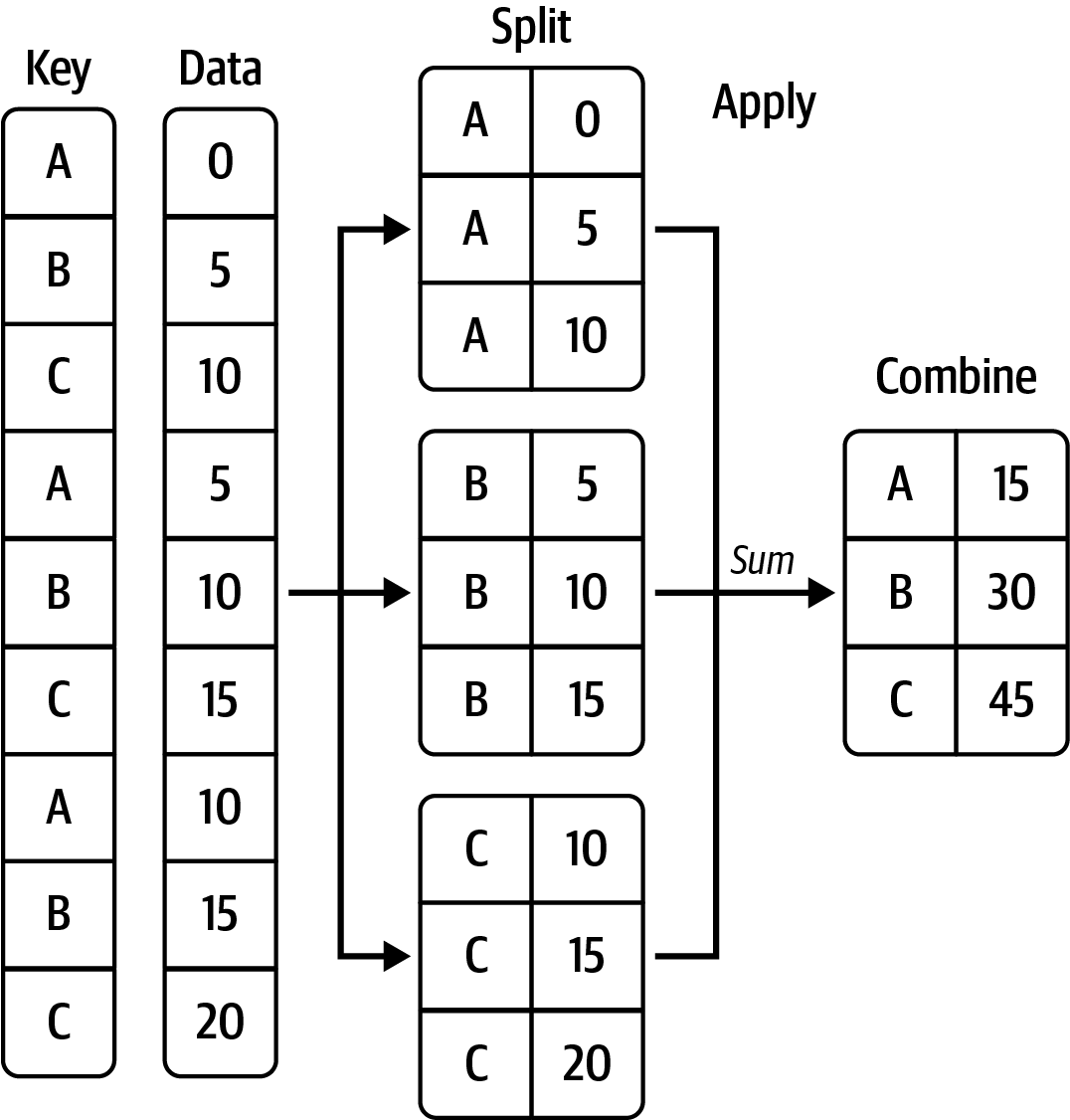
카테고리별로 나뉘어진 데이터에 대한 통계치를 생성

  • groupby()는 데이터를 의미있는 그룹으로 나누어 분석할 수 있도록 해줌
  • .count(), .sum(), .mean(), .min(), .max()과 같은 통계치를 구하는 methods와 함께 효과적으로 자주 활용됨

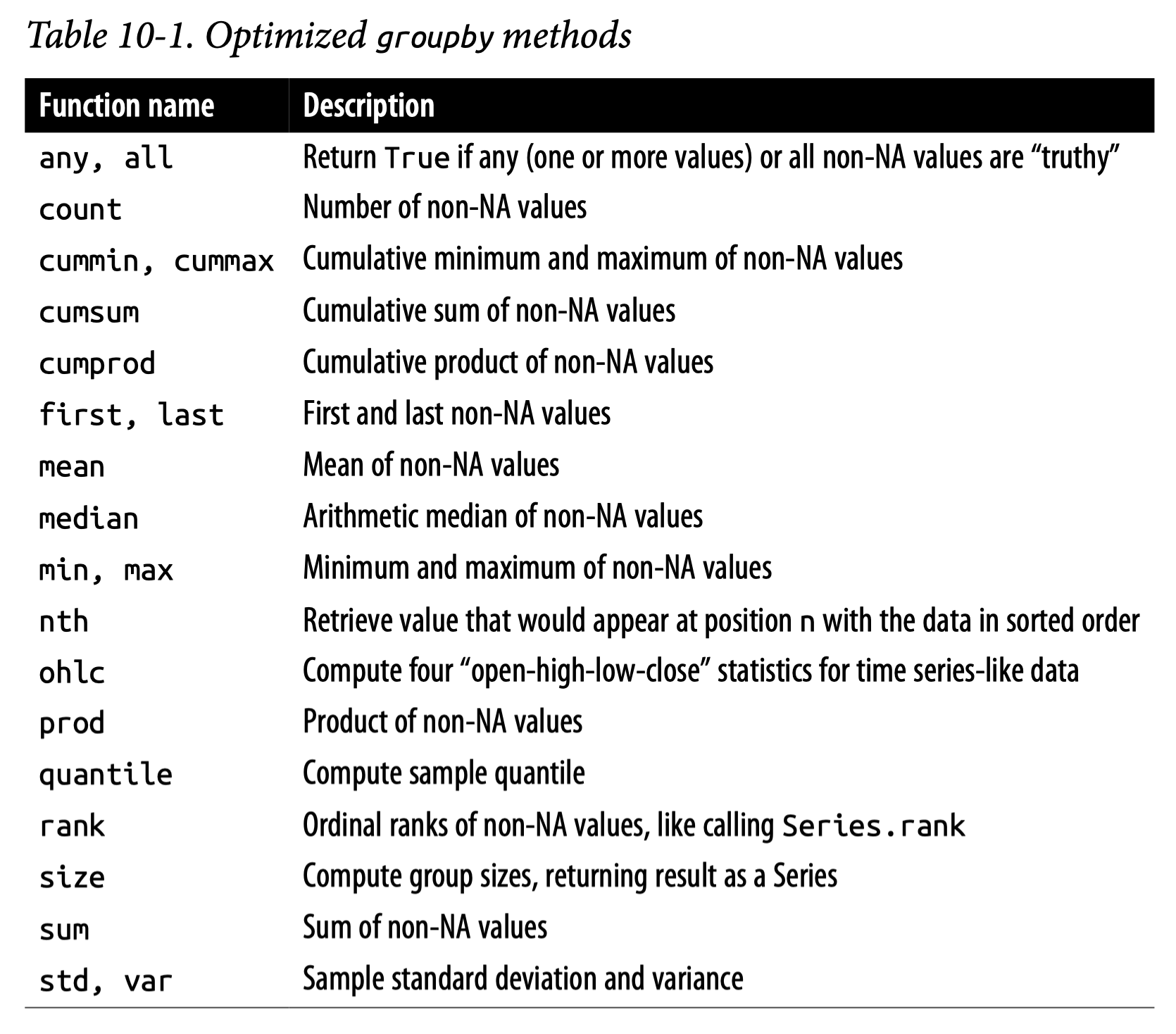
아래 표는 groupby()와 함께 자주 쓰이는 효율적인 methods

Source: Ch.10 in Python for Data Analysis (3e) by Wes McKinney

netflix.groupby("movie_id")["rating"].mean()
movie_id
6      2.963
10     3.278
16     3.045
        ... 
4483   3.192
4488   3.552
4492   2.657
Name: rating, Length: 844, dtype: Float64
netflix.groupby("user_id")["rating"].agg(["mean", "std"])
mean std
user_id
6 3.200 0.414
7 4.067 1.033
10 3.500 1.732
... ... ...
2649401 4.200 1.095
2649426 3.667 0.577
2649429 4.000 0.894

336915 rows × 2 columns

def min_max(x):
    return pd.Series([x.min(), x.max()], index=["min", "max"])  # Series를 반환

netflix.groupby("movie_id")["rating"].apply(min_max)
movie_id     
6         min    1
          max    5
10        min    1
                ..
4488      max    5
4492      min    1
          max    5
Name: rating, Length: 1688, dtype: int8
def standardize_by_user(x):
    return (x - x.mean()) / x.std()

(
    netflix
    .groupby("user_id")["rating"]
    .apply(standardize_by_user)
    .reset_index(level=0)
)
user_id rating
117541 6 -0.483
324856 6 1.932
412793 6 -0.483
... ... ...
1340788 2649429 1.118
1384493 2649429 -1.118
1683632 2649429 -1.118

1862726 rows × 2 columns

Exploratory Data Analysis (EDA)

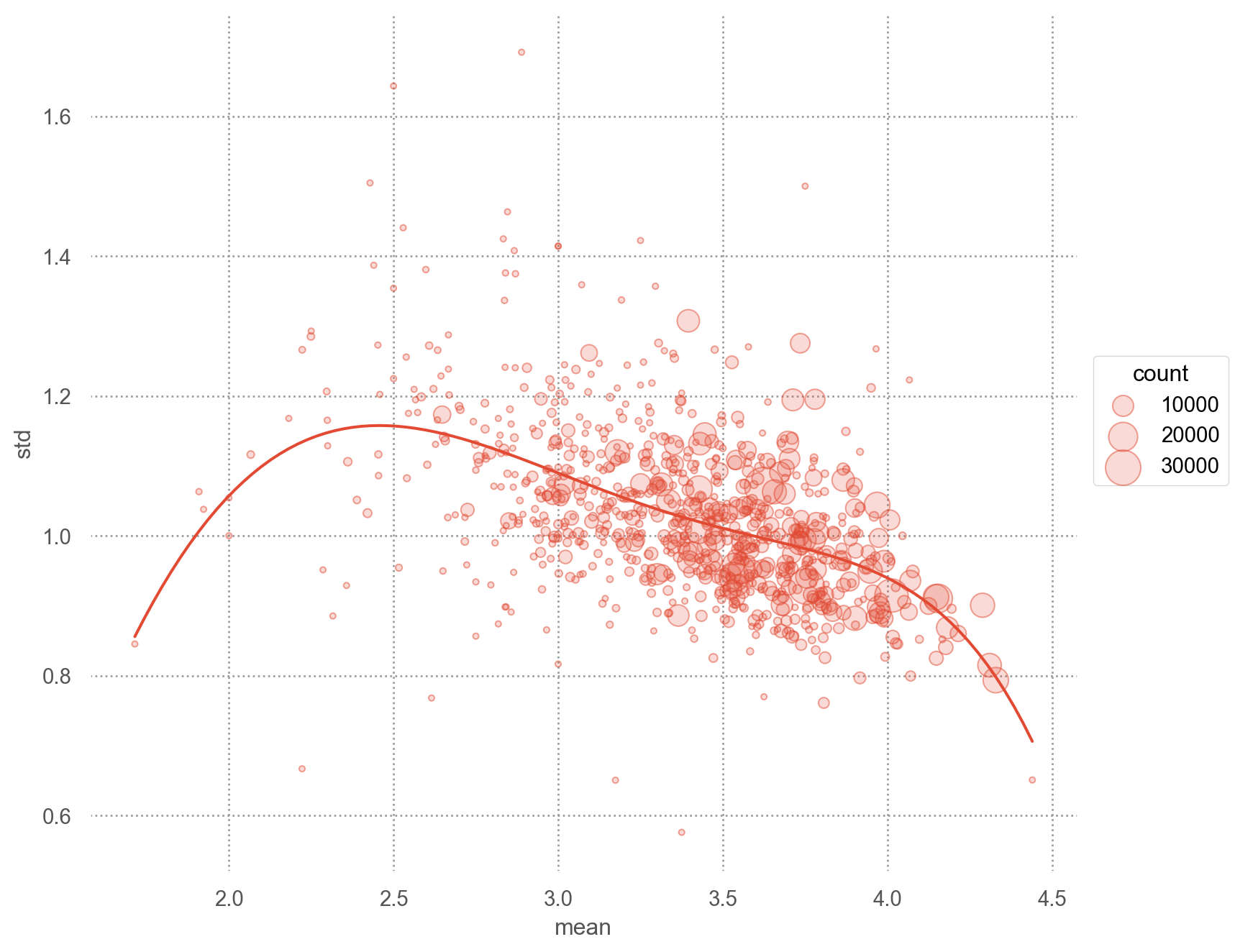
평점 분포

mean_ratings = (
    netflix
    .groupby("title")["rating"]  # title보다는 movie_id로 그룹화하는 것이 더 적절함
    .agg(["mean", "std", "count"])
    .reset_index()
)
mean_ratings
title mean std count
0 10 3.104 0.956 498
1 10 Things I Hate About You 3.728 0.992 4705
2 11:14 3.203 1.030 266
... ... ... ... ...
822 Wrongfully Accused 3.290 1.143 252
823 Yellow Submarine 3.575 1.105 784
824 Youngblood 3.256 1.029 328

825 rows × 4 columns

mean_ratings.sort_values("mean", ascending=False)
title mean std count
430 Paradise Lost: The Child Murders at Robin Hood... 4.440 0.651 25
734 The Sixth Sense 4.329 0.793 15166
733 The Silence of the Lambs 4.310 0.815 12940
... ... ... ... ...
468 Red Riding Hood 1.923 1.038 13
476 Rhinestone 1.909 1.063 66
562 Stuck on You 1.714 0.845 21

825 rows × 4 columns

(
    so.Plot(mean_ratings, x="mean", y="std")
    .add(so.Dots(alpha=.5), pointsize="count")
    .add(so.Line(), so.PolyFit(5))
    .scale(pointsize=(3, 20))
    .layout(size=(8, 7))
)

netflix2 = (
    netflix
    .assign(
        decade=lambda x: x["year"] // 10 * 10,  # 10년 단위
        weekday=lambda x: x["date"].dt.day_name().str[:3],
        weekend=lambda x: x["weekday"].isin(["Sat", "Sun"]),
        title_length=lambda x: x["title"].str.len()
    )
)

netflix2["weekday"] = netflix2["weekday"].astype("category").cat.set_categories(["Mon", "Tue", "Wed", "Thu", "Fri", "Sat", "Sun"])

netflix2.head()
movie_id user_id rating date title genre year decade weekday weekend title_length
0 3282 972104 4 2005-09-16 Sideways [Comedy, Drama, Romance] 2004 2000 Fri False 8
1 143 2297762 5 2004-08-07 The Game [Drama, Mystery, Thriller] 1997 1990 Sat True 8
2 1744 1489846 3 2003-05-22 Beverly Hills Cop [Action, Comedy, Crime] 1984 1980 Thu False 17
3 357 1169994 5 2004-04-22 House of Sand and Fog [Crime, Drama] 2003 2000 Thu False 21
4 3256 722964 3 2004-03-08 Swimming Pool [Crime, Drama, Mystery] 2003 2000 Mon False 13
mean_ratings_by_wday = (
    netflix2
    .groupby(["weekday"])["rating"]
    .agg(["mean", "std", "count"])
    .reset_index()
)
mean_ratings_by_wday
weekday mean std count
0 Mon 3.584 1.054 324006
1 Tue 3.582 1.054 331272
2 Wed 3.590 1.055 311012
3 Thu 3.593 1.057 267394
4 Fri 3.589 1.061 245186
5 Sat 3.596 1.065 184385
6 Sun 3.596 1.060 199471

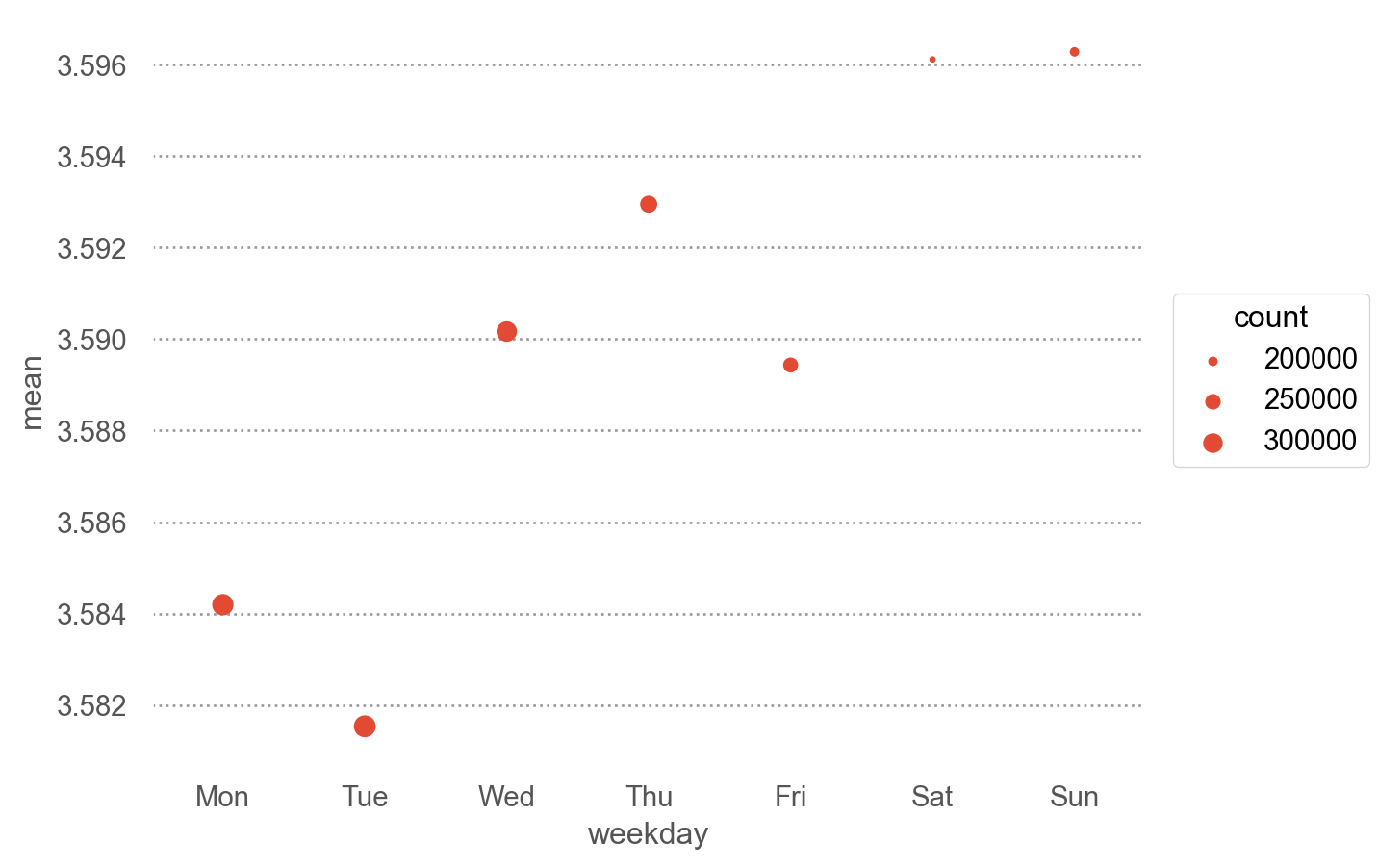
요일별 평점

(
    so.Plot(mean_ratings_by_wday, x="weekday", y="mean")
    .add(so.Dot(), pointsize="count")
)

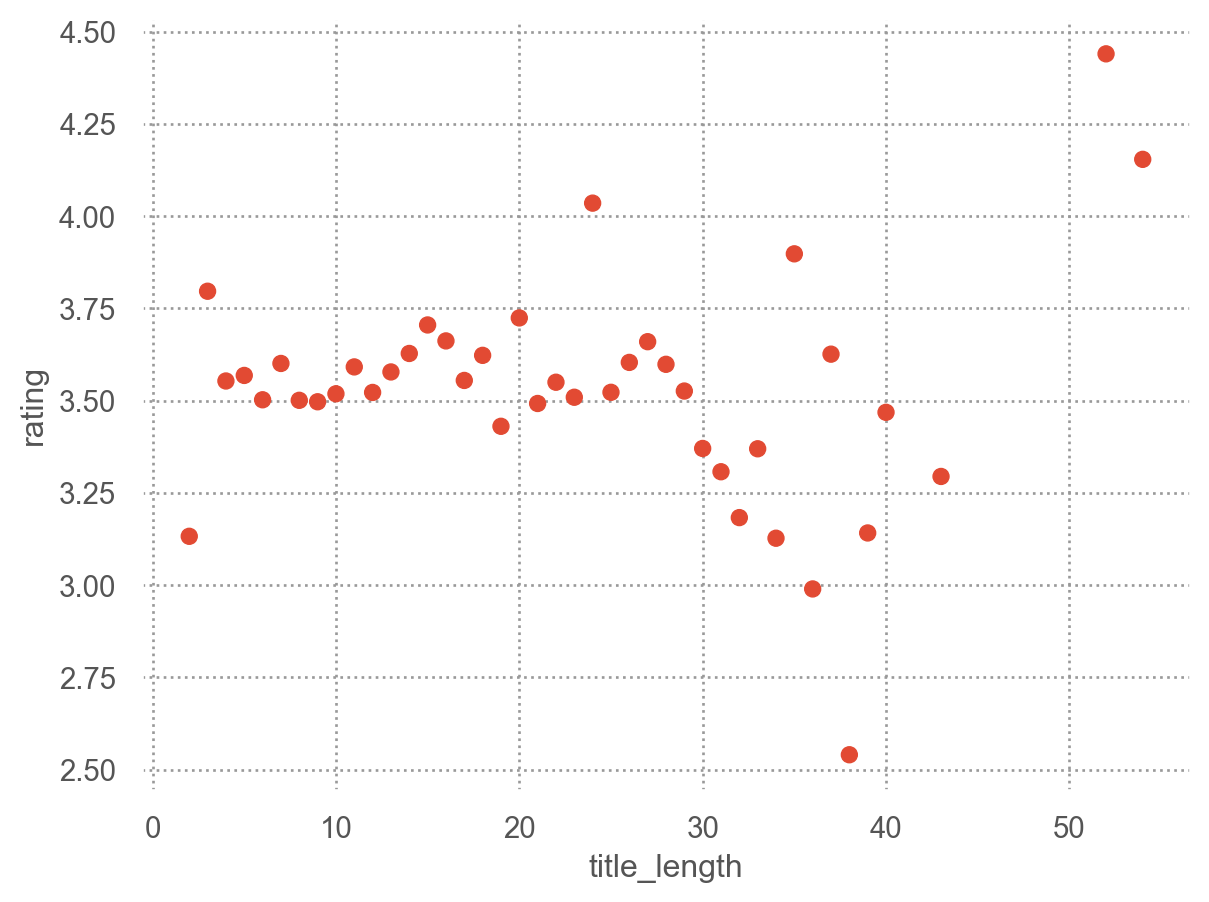
제목의 길이?

(
    so.Plot(netflix2, x="title_length", y="rating")
    .add(so.Dot(), so.Agg("mean"))
)

시청자별 분석

viewing_count = netflix.groupby("user_id")["rating"].size()
viewing_count
user_id
6          15
7          15
10          4
           ..
2649401     5
2649426     3
2649429     6
Name: rating, Length: 336915, dtype: Int64
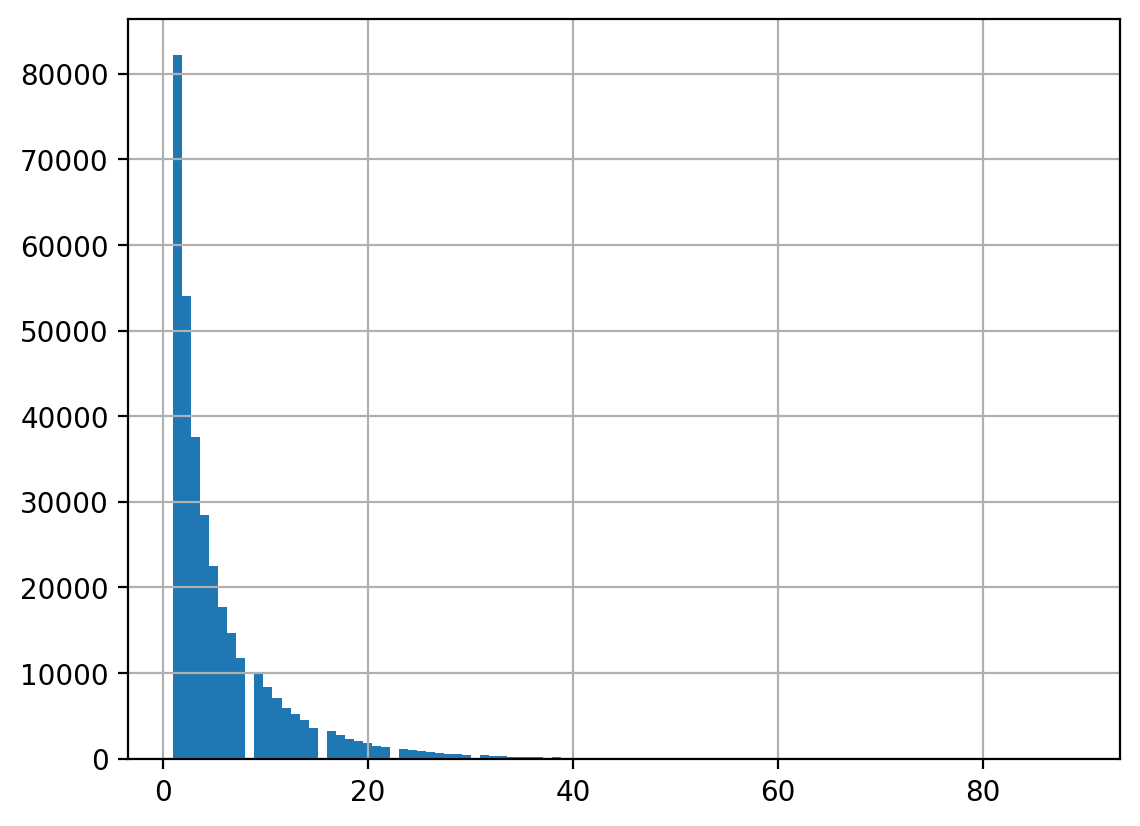
# pandas의 method를 사용한 시각화
viewing_count.hist(bins=100);

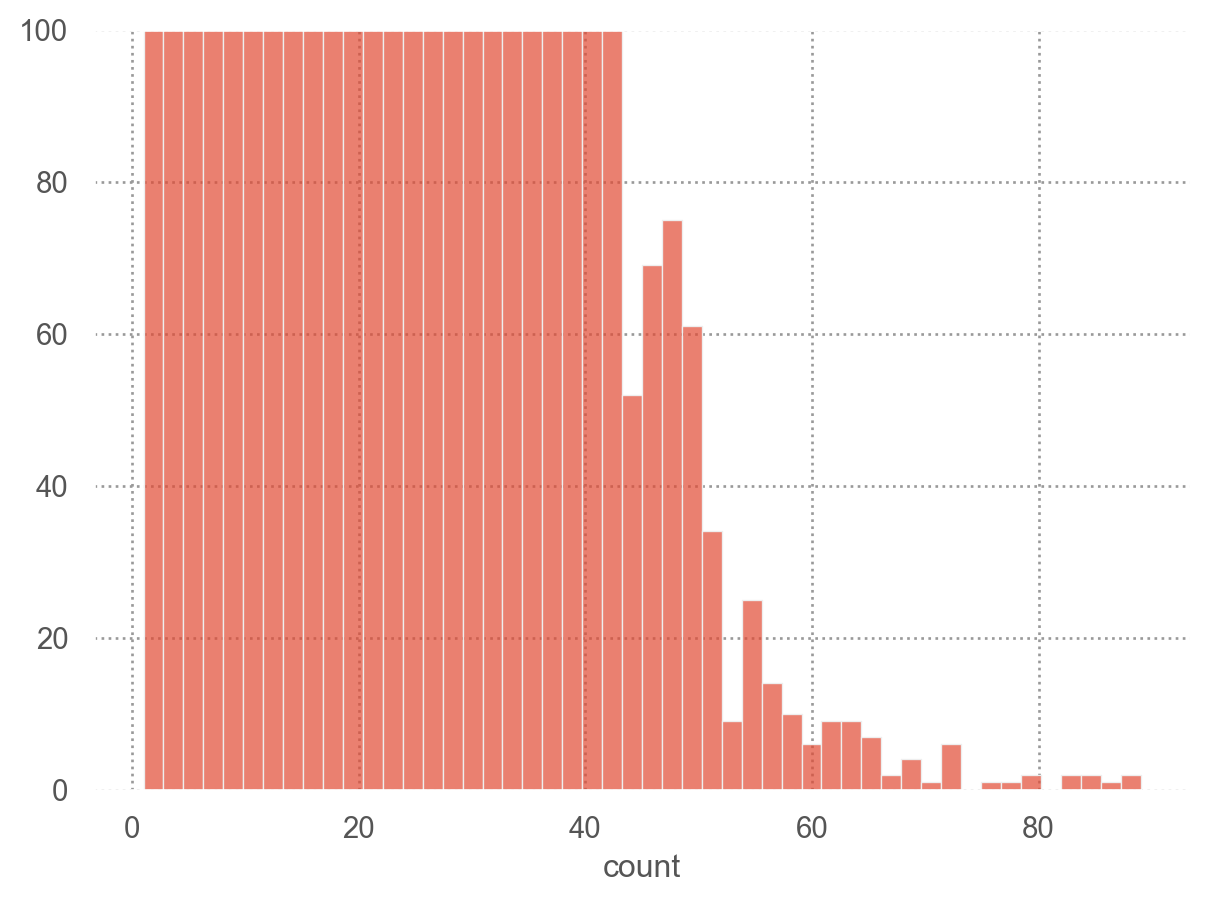
viewing_count_df = viewing_count.reset_index(name="count")
(
    so.Plot(viewing_count_df, x="count")
    .add(so.Bars(), so.Hist(bins=50))
    .limit(y=(0, 100))
)

user_stats = (
    netflix
    .groupby("user_id")["rating"]
    .agg(["mean", "std", "count"])
)
user_stats
mean std count
user_id
6 3.200 0.414 15
7 4.067 1.033 15
10 3.500 1.732 4
... ... ... ...
2649401 4.200 1.095 5
2649426 3.667 0.577 3
2649429 4.000 0.894 6

336915 rows × 3 columns

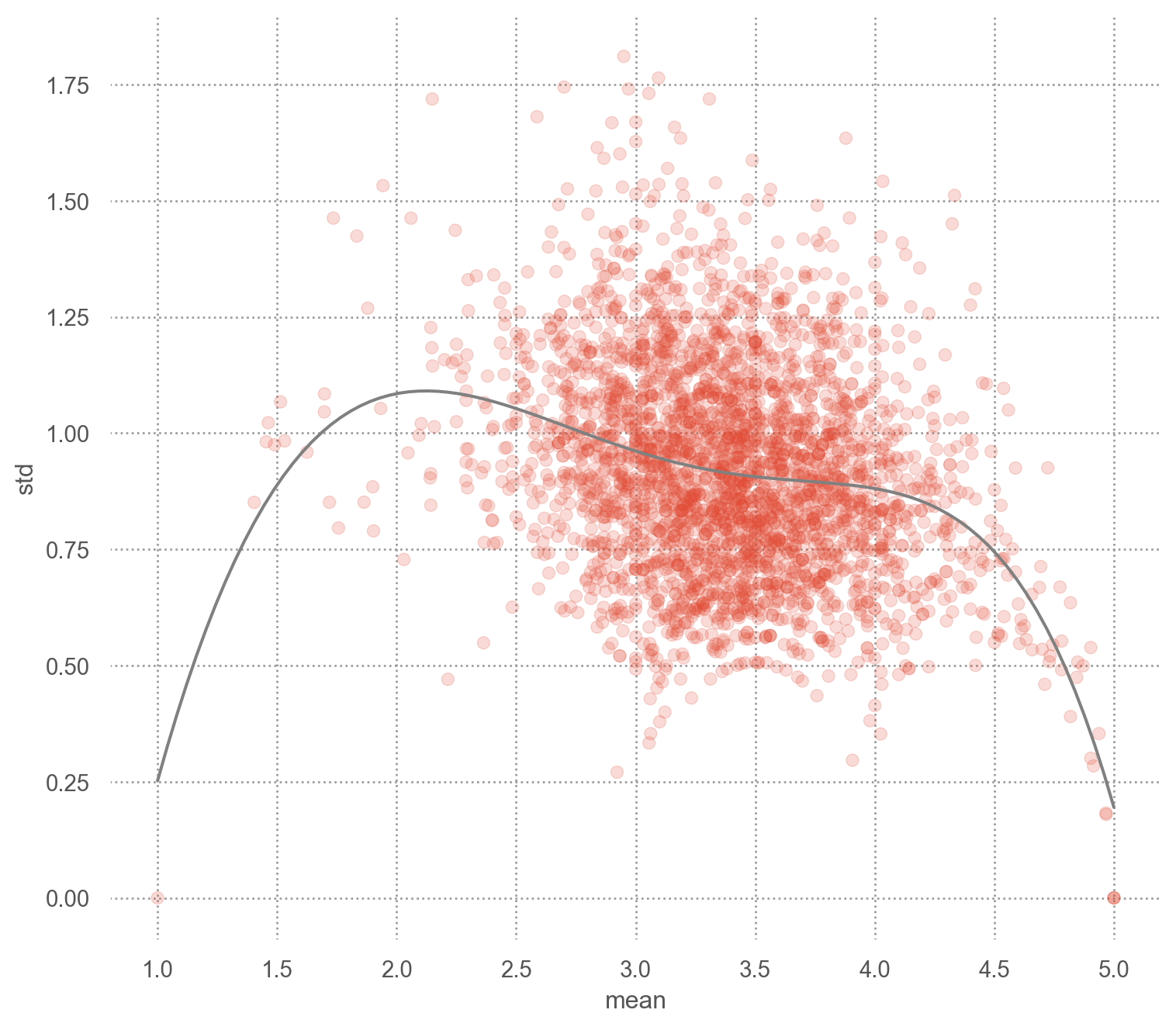
user_stat_30 = user_stats.query("count >= 30")
user_stat_30
mean std count
user_id
1333 2.674 0.778 43
2213 3.871 0.846 31
2455 3.433 0.817 30
... ... ... ...
2646574 3.119 0.803 42
2647197 3.389 1.153 36
2648287 3.600 0.847 35

3051 rows × 3 columns

(
    so.Plot(user_stat_30, x="mean", y="std")
    .add(so.Dot(alpha=.2))
    .add(so.Line(color=".5"), so.PolyFit(5))
    .layout(size=(8, 7))
)

장르별 분석

netflix["genre"]
0            [Comedy, Drama, Romance]
1          [Drama, Mystery, Thriller]
2             [Action, Comedy, Crime]
                      ...            
1862723      [Drama, Horror, Mystery]
1862724       [Action, Comedy, Crime]
1862725       [Biography, Drama, War]
Name: genre, Length: 1862726, dtype: object
netflix_long = netflix.explode('genre')
netflix_long
movie_id user_id rating date title genre year
0 3282 972104 4 2005-09-16 Sideways Comedy 2004
0 3282 972104 4 2005-09-16 Sideways Drama 2004
0 3282 972104 4 2005-09-16 Sideways Romance 2004
... ... ... ... ... ... ... ...
1862725 2782 1465983 4 2005-06-22 Braveheart Biography 1995
1862725 2782 1465983 4 2005-06-22 Braveheart Drama 1995
1862725 2782 1465983 4 2005-06-22 Braveheart War 1995

4806517 rows × 7 columns

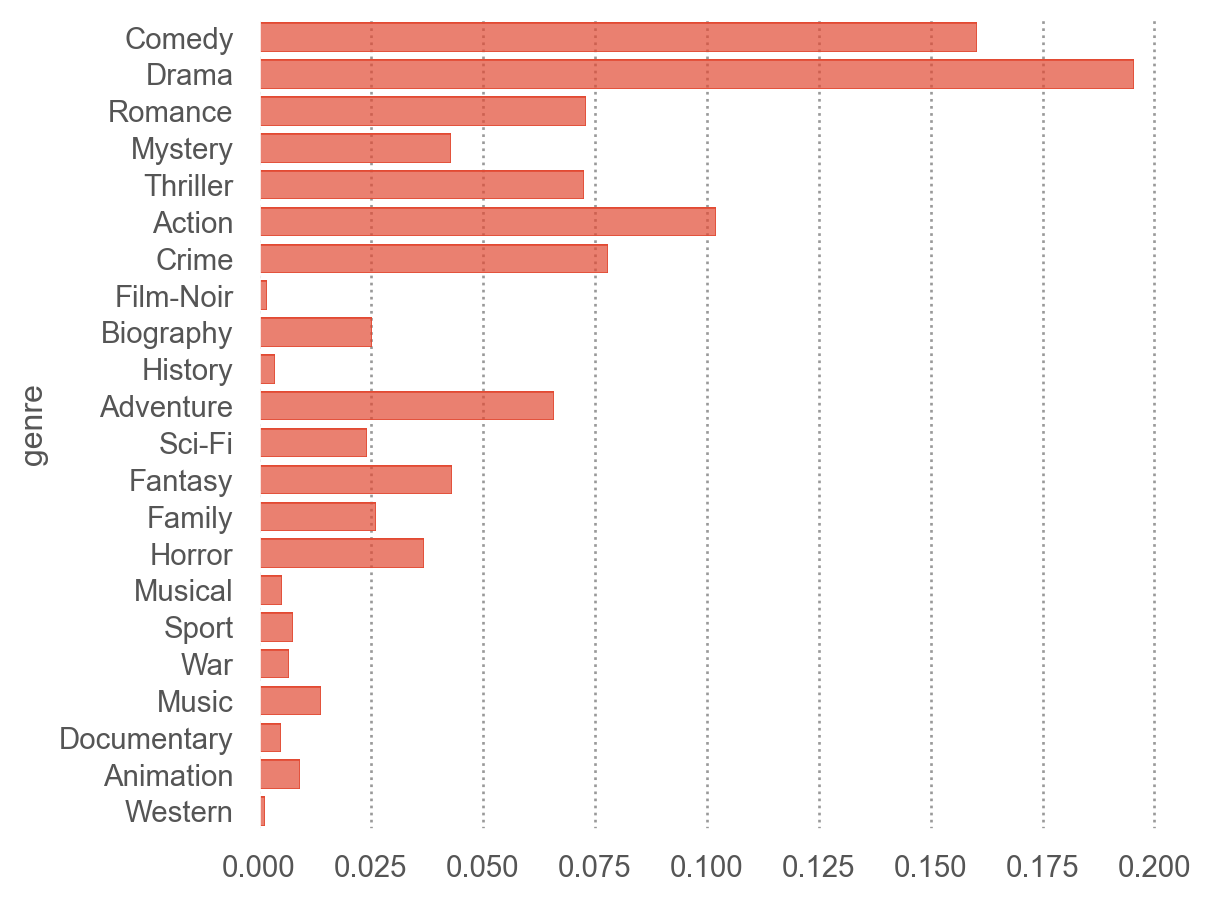
(
    so.Plot(netflix_long, y="genre")  # y에 genre가 나오도록!
    .add(so.Bar(), so.Hist("proportion"))
)

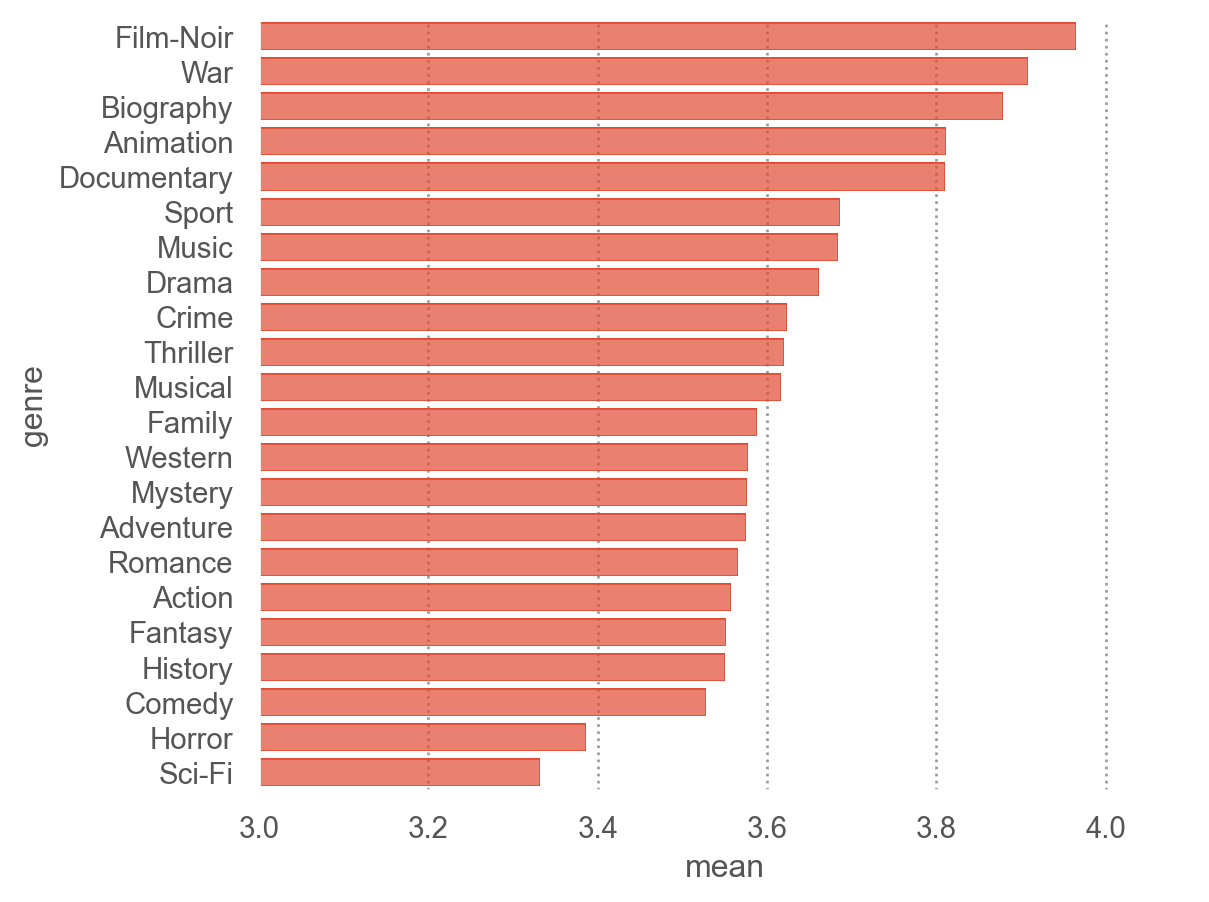
genre_mean = (
    netflix_long
    .groupby('genre')['rating']
    .agg(['mean', 'std', 'count'])
    .reset_index()
)
genre_mean
genre mean std count
0 Action 3.557 1.050 490601
1 Adventure 3.576 1.064 316881
2 Animation 3.811 1.018 44297
... ... ... ... ...
19 Thriller 3.620 1.030 348897
20 War 3.908 1.037 32304
21 Western 3.577 1.045 6361

22 rows × 4 columns

genre_mean.nlargest(3, "mean")
genre mean std count
10 Film-Noir 3.965 0.935 9020
20 War 3.908 1.037 32304
3 Biography 3.878 0.995 121688
order_by_mean = genre_mean.sort_values("mean", ascending=False)["genre"].values

(
    so.Plot(genre_mean, y="genre", x="mean")
    .add(so.Bar())
    .scale(y=so.Nominal(order=order_by_mean))  # 그래프에 순서 부여
    .limit(x=(3, 4.1))
)

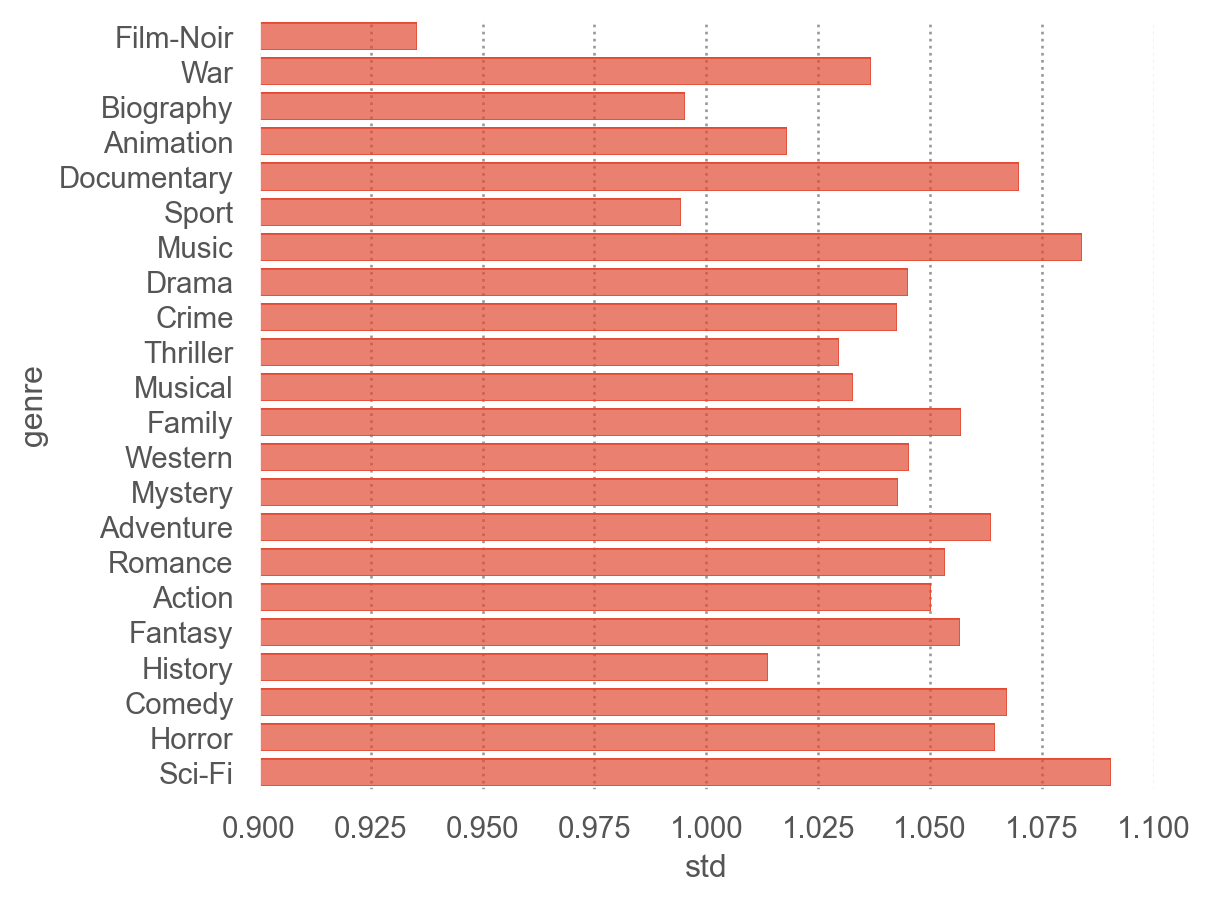
(
    so.Plot(genre_mean, y="genre", x="std")
    .add(so.Bar())
    .scale(y=so.Nominal(order=order_by_mean))  # 그래프에 순서 부여
    .limit(x=(.9, 1.1))
)

netflix_long["weekday"] = netflix_long["date"].dt.day_name().str[:3]
netflix_long["weekday"] = netflix_long["weekday"].astype("category").cat.set_categories(["Mon", "Tue", "Wed", "Thu", "Fri", "Sat", "Sun"])

genre_mean_by_weekday = (
    netflix_long
    .groupby(['genre', 'weekday'], observed=True)['rating']
    .agg(['mean', 'std', 'count'])
    .reset_index()
)
genre_mean_by_weekday
genre weekday mean std count
0 Action Mon 3.555 1.045 85715
1 Action Tue 3.549 1.043 86670
2 Action Wed 3.561 1.047 82093
... ... ... ... ... ...
151 Western Fri 3.581 1.034 836
152 Western Sat 3.555 1.015 632
153 Western Sun 3.602 0.997 738

154 rows × 5 columns

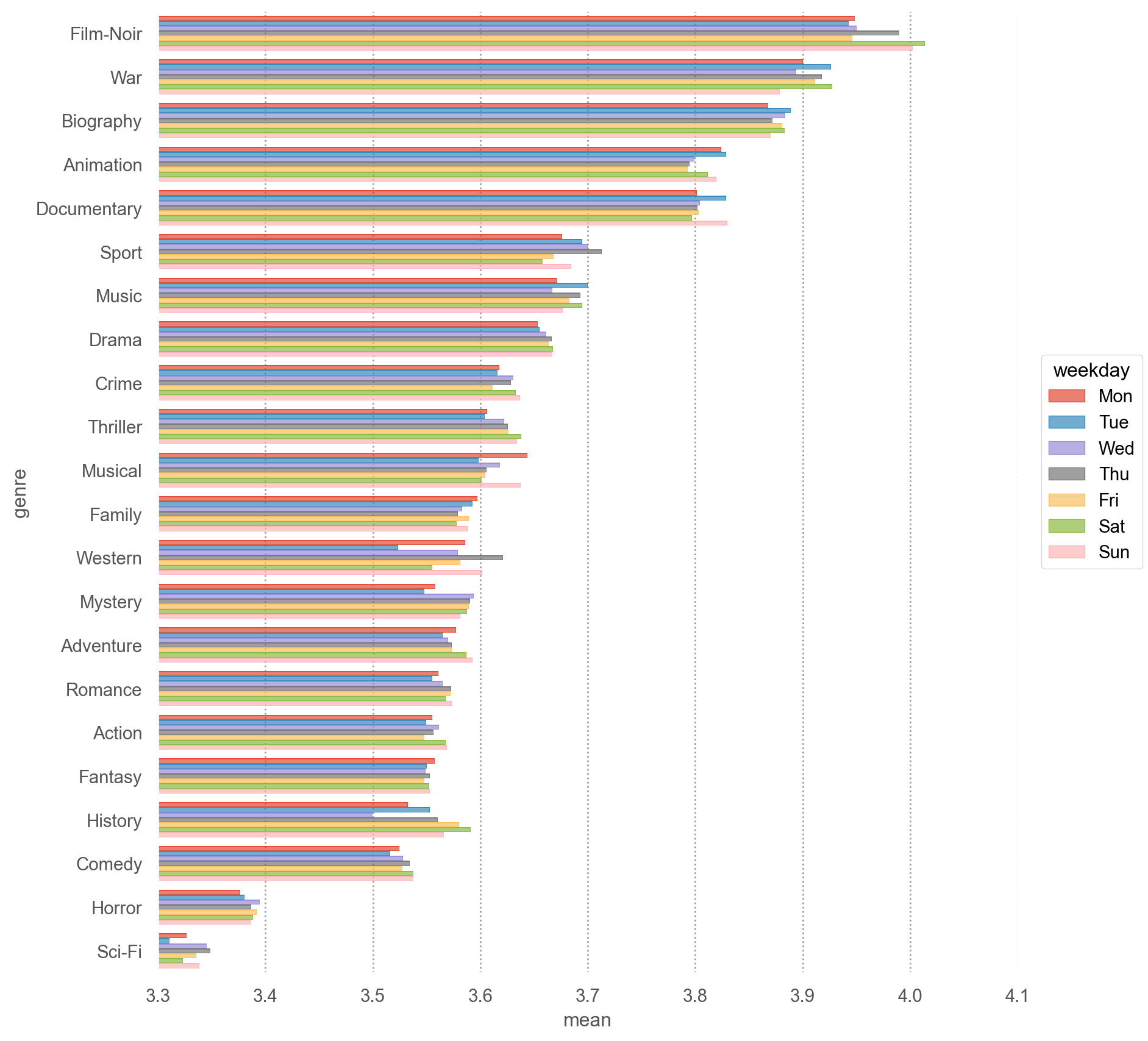
order_by_mean = genre_mean.sort_values("mean", ascending=False)["genre"].values

(
    so.Plot(genre_mean_by_weekday, y="genre", x="mean", color="weekday")
    .add(so.Bar(), so.Dodge())
    .scale(y=so.Nominal(order=order_by_mean))  # 그래프에 순서 부여
    # .facet("weekday")
    .limit(x=(3.3, 4.1))
    .layout(size=(9, 9))
)

mean_ratings_by_genre = (
    netflix_long
    .groupby(["title", "genre"])["rating"]
    .agg(["mean", "std", "count"])
    .reset_index()
)
mean_ratings_by_genre
title genre mean std count
0 10 Comedy 3.104 0.956 498
1 10 Romance 3.104 0.956 498
2 10 Things I Hate About You Comedy 3.728 0.992 4705
... ... ... ... ... ...
2201 Youngblood Drama 3.256 1.029 328
2202 Youngblood Romance 3.256 1.029 328
2203 Youngblood Sport 3.256 1.029 328

2204 rows × 5 columns

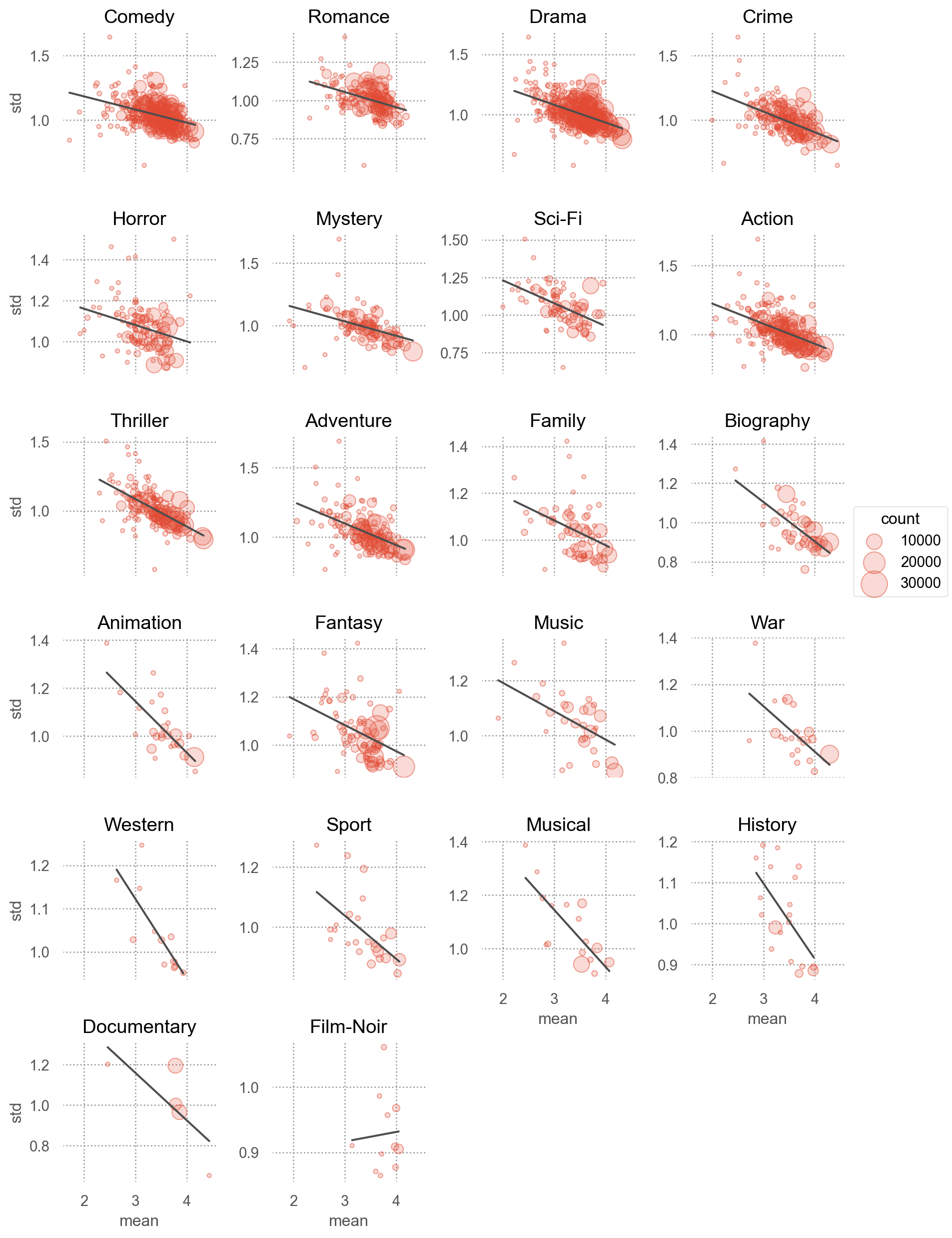
(
    so.Plot(mean_ratings_by_genre, x="mean", y="std")
    .add(so.Dots(alpha=.5), pointsize="count")
    .add(so.Line(color=".3"), so.PolyFit(1))
    .facet("genre", wrap=4)
    .share(y=False)
    .scale(pointsize=(3, 20))
    .layout(size=(9, 13))
)

출시년도

netflix.head(3)
movie_id user_id rating date title genre year
0 3282 972104 4 2005-09-16 Sideways [Comedy, Drama, Romance] 2004
1 143 2297762 5 2004-08-07 The Game [Drama, Mystery, Thriller] 1997
2 1744 1489846 3 2003-05-22 Beverly Hills Cop [Action, Comedy, Crime] 1984
netflix.groupby(["year", "title"])["rating"].agg(["mean", "count"])
mean count
year title
1916 20,000 Leagues Under the Sea 3.704 162
1918 Chaplin 3.000 47
1922 Robin Hood 3.080 75
... ... ... ...
2005 The Hitchhiker's Guide to the Galaxy 2.997 2949
The Pacifier 3.580 3966
Unleashed 3.733 845

844 rows × 2 columns

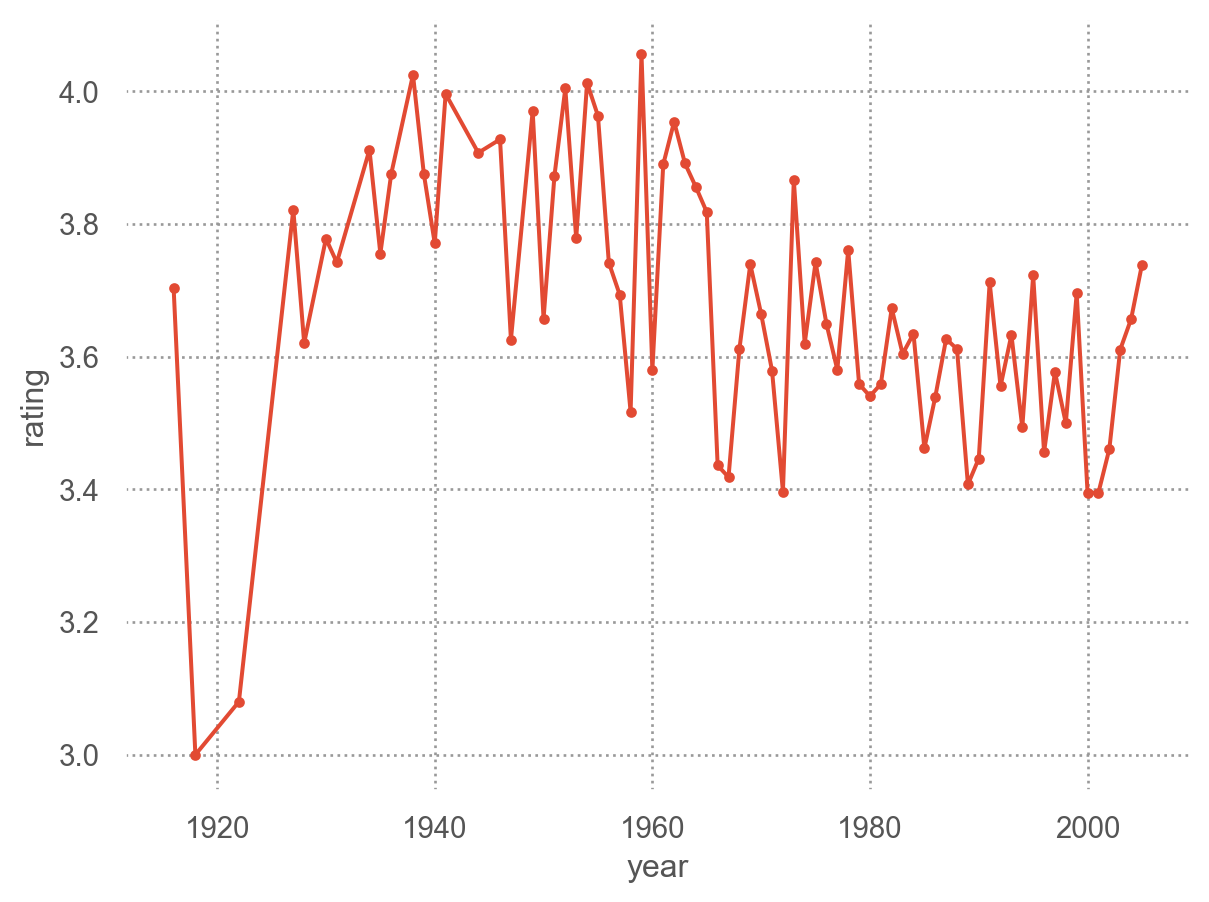
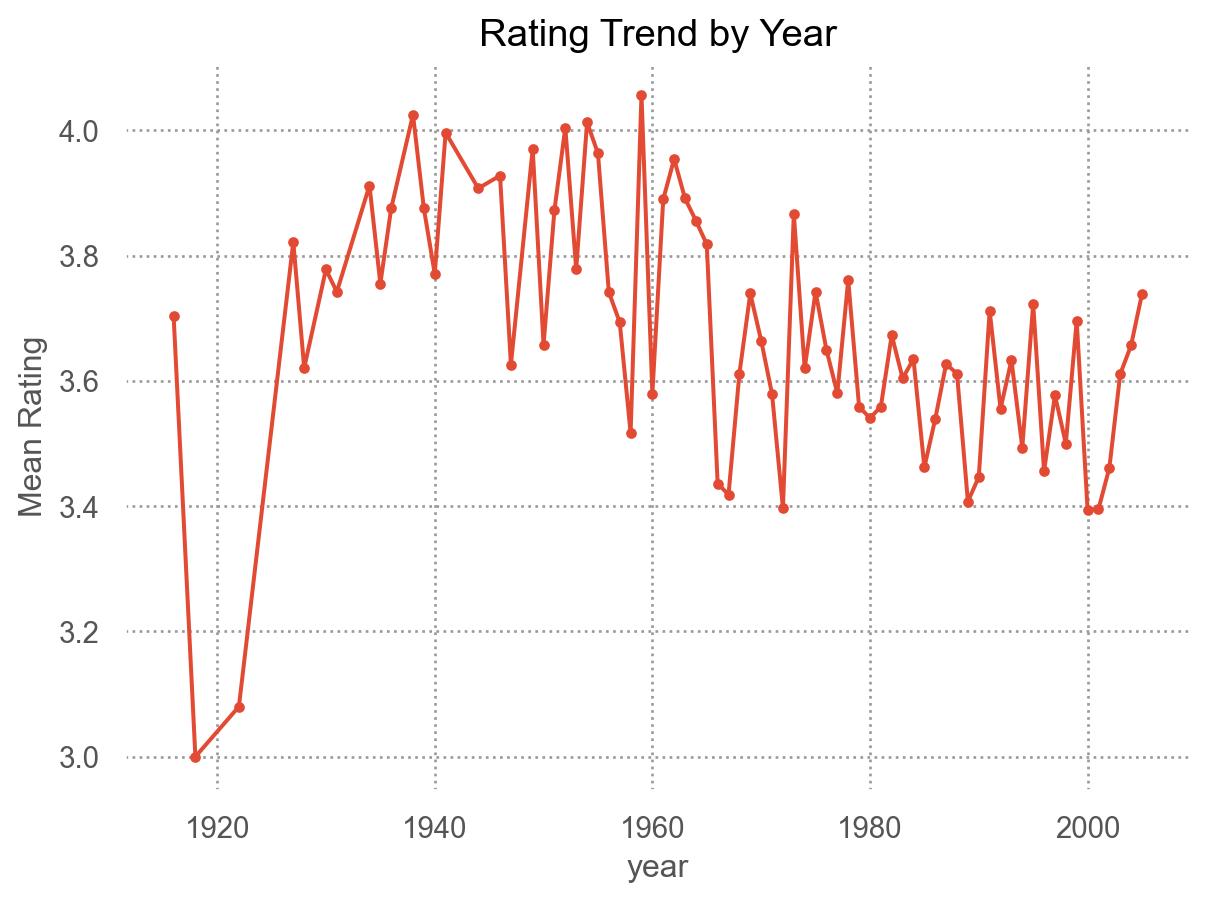
(
    so.Plot(netflix, x="year", y="rating")
    .add(so.Line(marker="."), so.Agg("mean"))
)

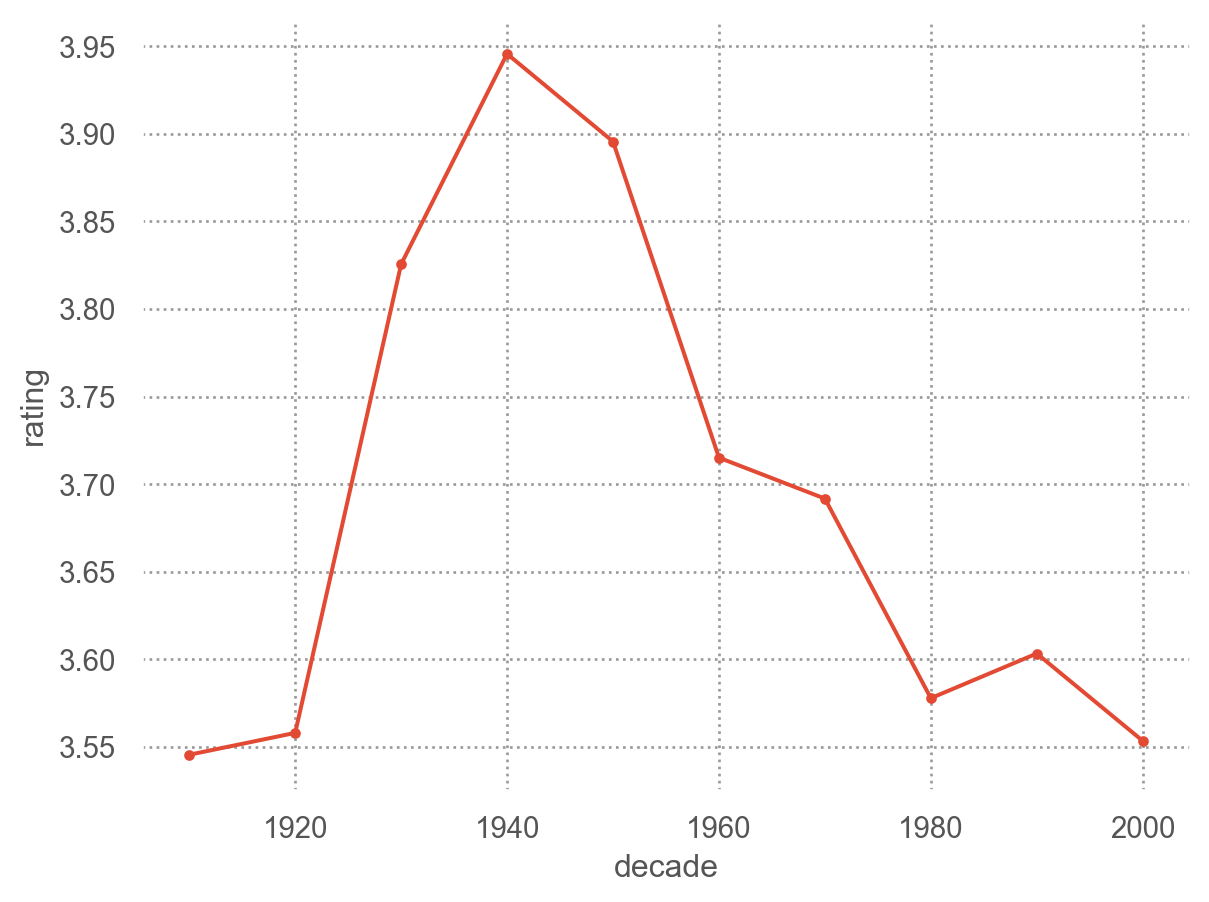
# 10년 단위로 
netflix["decade"] = netflix["year"] // 10 * 10
(
    so.Plot(netflix, x="decade", y="rating")
    .add(so.Line(marker="."), so.Agg("mean"))
)

Module로 변환/활용

반복되는 분석 패턴을 netflix_utils.py 모듈로 분리하고 함수들을 정의

netflix_utils.py 다운로드

import netflix_utils as nu

# 데이터 로딩 및 환경 설정
nu.setup_display(max_rows=6)
netflix = nu.load_netflix_data("data/netflix_ratings.parquet")
netflix.head(3)
movie_id user_id rating date title genre year
0 3282 972104 4 2005-09-16 Sideways [Comedy, Drama, Romance] 2004
1 143 2297762 5 2004-08-07 The Game [Drama, Mystery, Thriller] 1997
2 1744 1489846 3 2003-05-22 Beverly Hills Cop [Action, Comedy, Crime] 1984
# 파생 변수 한 번에 추가 (decade, weekday, title_length)
netflix_enriched = nu.enrich_netflix(netflix)
netflix_enriched.head(3)
movie_id user_id rating date title genre year decade weekday title_length
0 3282 972104 4 2005-09-16 Sideways [Comedy, Drama, Romance] 2004 2000 Fri 8
1 143 2297762 5 2004-08-07 The Game [Drama, Mystery, Thriller] 1997 1990 Sat 8
2 1744 1489846 3 2003-05-22 Beverly Hills Cop [Action, Comedy, Crime] 1984 1980 Thu 17
# 영화별 통계 (최소 30명 이상 평가한 영화만)
m_stats = nu.movie_stats(netflix, min_count=30)
m_stats.sort_values("mean", ascending=False).head()
title mean std count
734 The Sixth Sense 4.329 0.793 15166
733 The Silence of the Lambs 4.310 0.815 12940
101 Braveheart 4.289 0.901 13590
72 Batman Begins 4.215 0.860 5529
510 Sense and Sensibility 4.195 0.896 1133
# 사용자별 통계 (최소 30개 이상 평가한 사용자만)
u_stats = nu.user_stats(netflix, min_count=30)
u_stats.head()
mean std count
user_id
1333 2.674 0.778 43
2213 3.871 0.846 31
2455 3.433 0.817 30
2905 3.700 1.418 30
3321 2.977 1.012 43
# 장르별 통계
g_stats = nu.genre_stats(netflix)
g_stats.sort_values("mean", ascending=False)
genre mean std count
10 Film-Noir 3.965 0.935 9020
20 War 3.908 1.037 32304
3 Biography 3.878 0.995 121688
... ... ... ... ...
4 Comedy 3.528 1.067 770697
12 Horror 3.386 1.065 177556
17 Sci-Fi 3.332 1.090 115480

22 rows × 4 columns

# 범용 집계: 요일별 평점
netflix_enriched = nu.add_ordered_weekday(netflix)
nu.rating_stats_by(netflix_enriched, "weekday")
weekday mean std count
0 Mon 3.584 1.054 324006
1 Tue 3.582 1.054 331272
2 Wed 3.590 1.055 311012
... ... ... ... ...
4 Fri 3.589 1.061 245186
5 Sat 3.596 1.065 184385
6 Sun 3.596 1.060 199471

7 rows × 4 columns

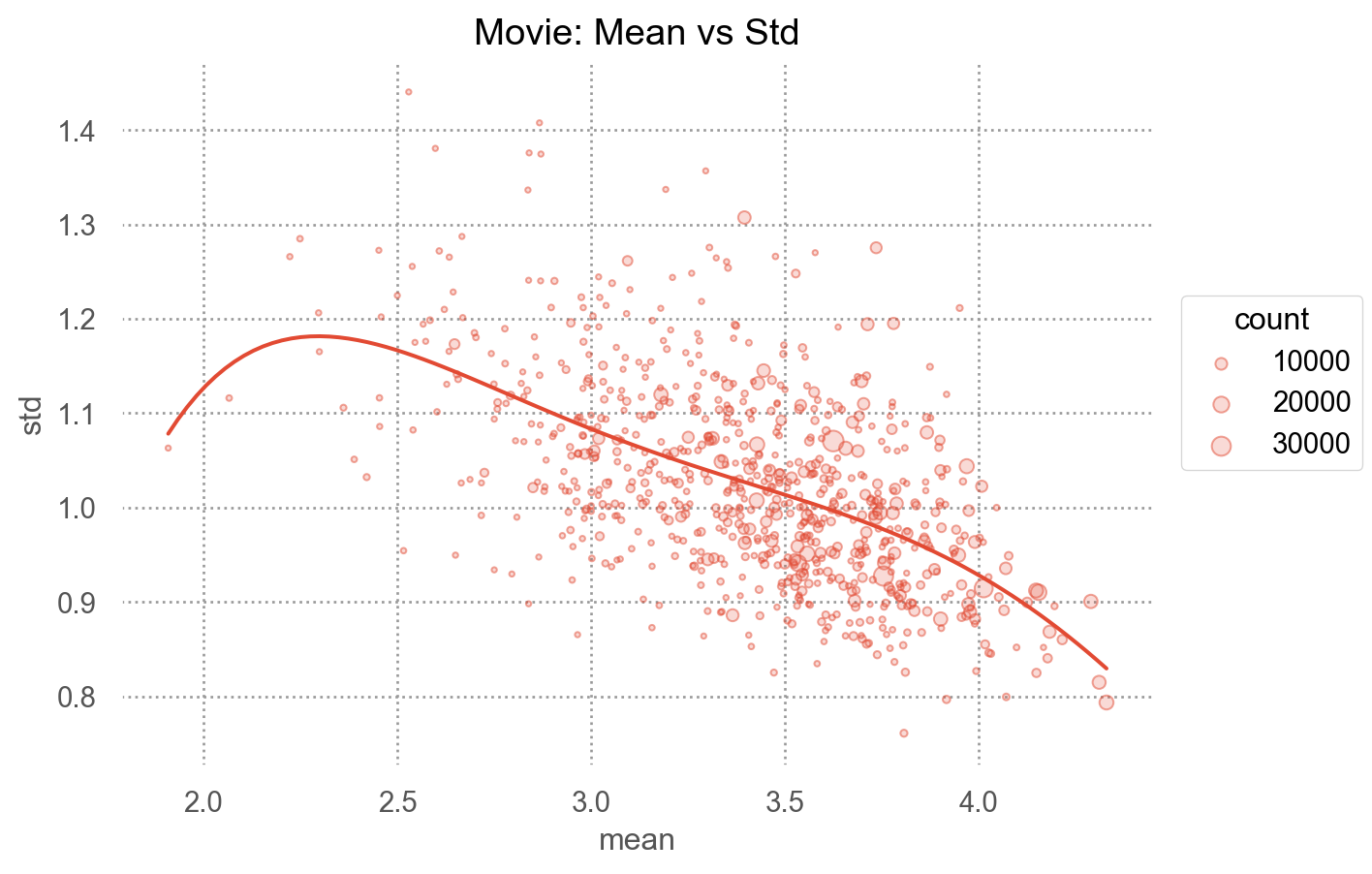
# 시각화: 평균 vs 표준편차 산점도
nu.plot_mean_vs_std(m_stats, title="Movie: Mean vs Std")

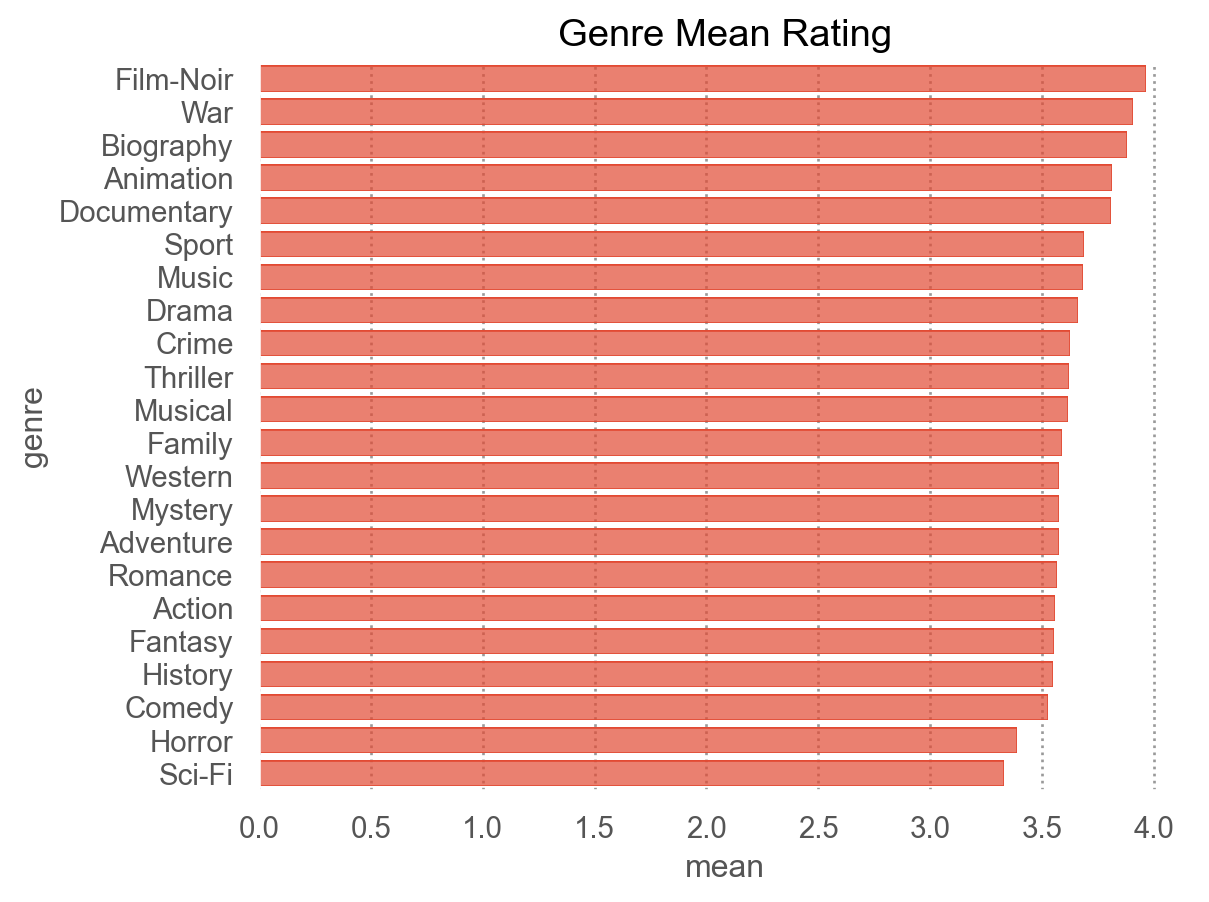
# 시각화: 장르 순위
nu.plot_genre_ranking(g_stats, metric="mean", title="Genre Mean Rating")

# 시각화: 연도별 평점 추세
nu.plot_trend_by_year(netflix, x_col="year", title="Rating Trend by Year")

# 사용자별 평점 표준화 (z-score)
standardized = nu.standardize_rating_by(netflix, group_col="user_id")
standardized.head()
user_id rating
117541 6 -0.483
324856 6 1.932
412793 6 -0.483
448624 6 1.932
604841 6 -0.483

Package로 변환/활용

netflix_analysis 패키지 다운로드

netflix_analysis/            ← 패키지 (폴더)
├── __init__.py              ← 패키지 진입점, 공개 API를 모아 줌
├── config.py                ← 설정값/상수 (AnalysisConfig)
├── loading.py               ← 데이터 로딩 + 검증
├── preprocessing.py         ← 파생 변수 생성 (.pipe() 활용)
├── analytics.py             ← 집계/분석 (NetflixAnalyzer 클래스)
└── reporting.py             ← 결과 리포트 생성
  • 모듈 → 패키지: 폴더 + __init__.py 로 여러 파일을 하나로 묶기
  • 공개 API 설계: __init__.py 에서 자주 쓰는 이름만 골라 노출 (import netflix_analysis as na)
  • 상대 임포트: 패키지 내부에서 from .config import AnalysisConfig
  • dataclass 로 설정 관리: 매직 넘버를 AnalysisConfig 한곳으로
  • 클래스(OOP): 데이터를 들고 다니는 NetflixAnalyzer
  • 타입 힌트 / 예외 / 캐싱 같은 실전 코드 패턴

패키지 불러오기

import netflix_analysis as na

# 패키지가 노출하는 공개 API 확인
print("version:", na.__version__)
print("public API:", na.__all__)
version: 0.1.0
public API: ['AnalysisConfig', 'DataValidationError', 'load_ratings', 'validate_columns', 'enrich', 'add_decade', 'add_ordered_weekday', 'add_title_length', 'normalize_genre', 'NetflixAnalyzer', 'build_markdown_report']

NetflixAnalyzer: 데이터를 들고 다니는 분석기 객체

  • 앞서 모듈 netflix_utils.py에서는 함수마다 DataFrame을 인자로 넘겼음
  • 패키지에서는 데이터를 한 번 담은 객체를 만들고, 그 객체에 .top_movies(), .genre_summary() 같은 메시지를 보냄
  • from_path()는 경로에서 바로 분석기를 만들어 주는 대체 생성자임.
# 경로에서 바로 분석기 생성 (load + 검증 + 파생변수 준비)
analyzer = na.NetflixAnalyzer.from_path("data/netflix_ratings.parquet")

print(analyzer)            # __repr__ 가 보여 주는 요약
analyzer.summary()         # 데이터 규모 요약 딕셔너리
NetflixAnalyzer(n_ratings=1,862,726, n_movies=844, min_movie_ratings=30)
{'n_ratings': 1862726,
 'n_users': 336915,
 'n_movies': 844,
 'mean_rating': np.float64(3.589),
 'year_range': (1916, 2005)}
# 평점 높은 영화 Top 5 (평가 수 하한은 설정값 min_movie_ratings 적용)
analyzer.top_movies(n=5)
mean std count
title
The Sixth Sense 4.329 0.793 15166
The Silence of the Lambs 4.310 0.815 12940
Braveheart 4.289 0.901 13590
Batman Begins 4.215 0.860 5529
Sense and Sensibility 4.195 0.896 1133
# 장르별 요약과 요일별 활동 (모두 메서드 호출 한 줄)
display(analyzer.genre_summary().head())
analyzer.weekday_activity()
mean std count
genre
Film-Noir 3.965 0.935 9020
War 3.908 1.037 32304
Biography 3.878 0.995 121688
Animation 3.811 1.018 44297
Documentary 3.810 1.070 23833
count mean
weekday
Mon 324006 3.584
Tue 331272 3.582
Wed 311012 3.590
... ... ...
Fri 245186 3.589
Sat 184385 3.596
Sun 199471 3.596

7 rows × 2 columns

AnalysisConfig: 설정으로 동작 바꾸기

dataclass의 활용
이유 설명
묶음 관리 관련 설정값들을 하나의 객체로 묶어서 전달·관리
간결한 선언 __init__, __repr__ 등을 직접 안 써도 됨
기본값 명시 top_n=10처럼 기본값을 한눈에 파악 가능
유효성 검사 __post_init__으로 잘못된 값 즉시 차단
  • 코드 곳곳에 흩어진 30, 4 같은 숫자(매직 넘버)를 AnalysisConfig 하나로 모음
  • 설정만 바꿔서 분석기의 동작을 통째로 조정할 수 있음
  • 잘못된 값을 주면 __post_init__에서 예방

설정값 묶음을 객체로 전달하기

분석 함수들이 설정값을 필요로 한 경우,

데이터클래스 없이 전역 변수만 쓴다면:

def analyze(data, top_n, min_movie_ratings, min_user_ratings, float_precision):
    ...  # 인자가 줄줄이 늘어남

데이터클래스를 쓰면:

def analyze(data, cfg: AnalysisConfig):
    ...  # cfg.top_n, cfg.min_movie_ratings 등으로 깔끔하게 접근

설정값이 6개든 10개든, 함수에는 cfg 하나만 넘기면 됨

# 더 엄격한 기준: 1000명 이상이 평가한 영화만, Top 7
strict = na.AnalysisConfig(min_movie_ratings=1000, top_n=7)
analyzer_strict = na.NetflixAnalyzer(analyzer.data, config=strict)
analyzer_strict.top_movies()
mean std count
title
The Sixth Sense 4.329 0.793 15166
The Silence of the Lambs 4.310 0.815 12940
Braveheart 4.289 0.901 13590
... ... ... ...
Sense and Sensibility 4.195 0.896 1133
Ray 4.182 0.868 11029
North by Northwest 4.177 0.840 4231

7 rows × 3 columns

# 잘못된 설정은 객체 생성 시점에 바로 걸러진다
try:
    na.AnalysisConfig(top_n=-1)
except ValueError as e:
    print("설정 오류:", e)
설정 오류: top_n은 양수여야 합니다: -1

.pipe(): 변환 함수를 체이닝하기

파생 변수 생성 단계를 작은 함수로 나누고, pandas의 .pipe() 메서드로 순서대로 연결합니다. 각 함수는 df를 받아 df를 돌려주므로 체이닝이 가능합니다. 필요한 변환만 골라 조합할 수도 있습니다.

raw = analyzer._raw

# 1) 개별 .pipe() 체이닝: 필요한 변환만 골라서 조합
(
    raw
    .pipe(na.add_decade)          # 연도 → 10년 단위
    .pipe(na.add_title_length)    # 제목 글자 수
    .loc[:, ["title", "year", "decade", "title_length"]]
)
title year decade title_length
0 Sideways 2004 2000 8
1 The Game 1997 1990 8
2 Beverly Hills Cop 1984 1980 17
... ... ... ... ...
1862723 Flatliners 1990 1990 10
1862724 Rush Hour 2 2001 2000 11
1862725 Braveheart 1995 1990 10

1862726 rows × 4 columns

# 2) 4개 변환 모두 조합
(
    raw
    .pipe(na.add_decade)
    .pipe(na.add_ordered_weekday)
    .pipe(na.add_title_length)
    .pipe(na.normalize_genre)
    .loc[:, ["title", "year", "decade", "weekday", "title_length", "genre"]]
)
title year decade weekday title_length genre
0 Sideways 2004 2000 Fri 8 [Comedy, Drama, Romance]
1 The Game 1997 1990 Sat 8 [Drama, Mystery, Thriller]
2 Beverly Hills Cop 1984 1980 Thu 17 [Action, Comedy, Crime]
... ... ... ... ... ... ...
1862723 Flatliners 1990 1990 Mon 10 [Drama, Horror, Mystery]
1862724 Rush Hour 2 2001 2000 Mon 11 [Action, Comedy, Crime]
1862725 Braveheart 1995 1990 Wed 10 [Biography, Drama, War]

1862726 rows × 6 columns

# 3) 위와 동일 — enrich()는 위 .pipe() 체이닝을 함수 하나로 묶은 것
na.enrich(raw).loc[:, ["title", "year", "decade", "weekday", "title_length", "genre"]]
title year decade weekday title_length genre
0 Sideways 2004 2000 Fri 8 [Comedy, Drama, Romance]
1 The Game 1997 1990 Sat 8 [Drama, Mystery, Thriller]
2 Beverly Hills Cop 1984 1980 Thu 17 [Action, Comedy, Crime]
... ... ... ... ... ... ...
1862723 Flatliners 1990 1990 Mon 10 [Drama, Horror, Mystery]
1862724 Rush Hour 2 2001 2000 Mon 11 [Action, Comedy, Crime]
1862725 Braveheart 1995 1990 Wed 10 [Biography, Drama, War]

1862726 rows × 6 columns

reporting: 분석과 표현의 분리

분석(NetflixAnalyzer)과 결과 표현(reporting)의 책임을 나눠 두면, 같은 분석 결과를 마크다운·HTML·PDF 등 다양한 형태로 재활용할 수 있습니다.

from IPython.display import Markdown

report = na.build_markdown_report(analyzer, top_n=5)
Markdown(report)  # markdown 형식으로 출력
Netflix 평점 데이터 리포트

개요

  • 총 평점 수: 1,862,726
  • 사용자 수: 336,915
  • 영화 수: 844
  • 평균 평점: 3.589
  • 출시 연도 범위: 1916–2005

평점 높은 영화 Top 5

  1. The Sixth Sense — 평균 4.33 (15166명)
  2. The Silence of the Lambs — 평균 4.31 (12940명)
  3. Braveheart — 평균 4.29 (13590명)
  4. Batman Begins — 평균 4.22 (5529명)
  5. Sense and Sensibility — 평균 4.20 (1133명)

인기 장르 Top 5

  1. Drama — 평가 939,328건, 평균 3.66
  2. Comedy — 평가 770,697건, 평균 3.53
  3. Action — 평가 490,601건, 평균 3.56
  4. Crime — 평가 374,283건, 평균 3.62
  5. Romance — 평가 351,176건, 평균 3.57
# Markdown 파일로 저장
from pathlib import Path

Path("report.md").write_text(report)
508
Notes

This work © 2025 by Sungkyun Cho is licensed under CC BY-NC-SA 4.0