Python Programming
  • Home
  • Intro
    • History & Background
    • Python Setup
  • Exercises
    • Chapter 5: Lists, Tuples, Sets
    • Chapter 6: Strings
    • Chapter 7: Dictionaries
    • Chapter 8: Control flow
    • Chapter 9: Functions
    • Chapter 14: Exceptions
    • Chapter 15: Classes
  • Exploring Data
    • NumPy & pandas
    • Inspecting data
    • Visualization
    • Plotting
  • Library System
  • Netflix Movie Analysis
  • References
    • QPB Part 1
    • QPB Part 2
    • QPB Part 3
    • QPB Part 4

On this page

  • Useful method
    • tips 데이터셋
    • penguins 데이터셋

Inspecting data

Load packages
# numerical calculation & data frames
import numpy as np
import pandas as pd

# visualization
import matplotlib.pyplot as plt
import seaborn as sns
import seaborn.objects as so

# statistics
import statsmodels.api as sm

# pandas options
pd.set_option('mode.copy_on_write', True)  # pandas 2.0
pd.options.display.float_format = '{:.2f}'.format  # pd.reset_option('display.float_format')
pd.options.display.max_rows = 8  # max number of rows to display

# NumPy options
np.set_printoptions(precision = 2, suppress=True)  # suppress scientific notation

# For high resolution display
import matplotlib_inline
matplotlib_inline.backend_inline.set_matplotlib_formats("retina")

Useful method

.head(), .tail(), .sample()
.info(), .describe(),
.value_counts(),
.sort_values(), .nlargest(), .nsmallest()

tips 데이터셋

일정기간 한 웨이터가 얻은 팁에 대한 데이터

# load a dataset from seaborn package
tips = sns.load_dataset("tips")
type(tips)
pandas.DataFrame
pd.DataFrame?
tips
     total_bill  tip     sex smoker   day    time  size
0         16.99 1.01  Female     No   Sun  Dinner     2
1         10.34 1.66    Male     No   Sun  Dinner     3
2         21.01 3.50    Male     No   Sun  Dinner     3
3         23.68 3.31    Male     No   Sun  Dinner     2
..          ...  ...     ...    ...   ...     ...   ...
240       27.18 2.00  Female    Yes   Sat  Dinner     2
241       22.67 2.00    Male    Yes   Sat  Dinner     2
242       17.82 1.75    Male     No   Sat  Dinner     2
243       18.78 3.00  Female     No  Thur  Dinner     2

[244 rows x 7 columns]
# DataFrame의 값들: ndarray (numpy array)
tips.values # or tips.to_numpy()
array([[16.99, 1.01, 'Female', ..., 'Sun', 'Dinner', 2],
       [10.34, 1.66, 'Male', ..., 'Sun', 'Dinner', 3],
       [21.01, 3.5, 'Male', ..., 'Sun', 'Dinner', 3],
       ...,
       [22.67, 2.0, 'Male', ..., 'Sat', 'Dinner', 2],
       [17.82, 1.75, 'Male', ..., 'Sat', 'Dinner', 2],
       [18.78, 3.0, 'Female', ..., 'Thur', 'Dinner', 2]],
      shape=(244, 7), dtype=object)
tips.info()
<class 'pandas.DataFrame'>
RangeIndex: 244 entries, 0 to 243
Data columns (total 7 columns):
 #   Column      Non-Null Count  Dtype   
---  ------      --------------  -----   
 0   total_bill  244 non-null    float64 
 1   tip         244 non-null    float64 
 2   sex         244 non-null    category
 3   smoker      244 non-null    category
 4   day         244 non-null    category
 5   time        244 non-null    category
 6   size        244 non-null    int64   
dtypes: category(4), float64(2), int64(1)
memory usage: 7.4 KB
tips.head() # 처음 N개 나열
   total_bill  tip     sex smoker  day    time  size
0       16.99 1.01  Female     No  Sun  Dinner     2
1       10.34 1.66    Male     No  Sun  Dinner     3
2       21.01 3.50    Male     No  Sun  Dinner     3
3       23.68 3.31    Male     No  Sun  Dinner     2
4       24.59 3.61  Female     No  Sun  Dinner     4
tips.describe() # numerical type만 나열
       total_bill    tip   size
count      244.00 244.00 244.00
mean        19.79   3.00   2.57
std          8.90   1.38   0.95
min          3.07   1.00   1.00
25%         13.35   2.00   2.00
50%         17.80   2.90   2.00
75%         24.13   3.56   3.00
max         50.81  10.00   6.00
tips.describe(include="all") # all types 나열
        total_bill    tip   sex smoker  day    time   size
count       244.00 244.00   244    244  244     244 244.00
unique         NaN    NaN     2      2    4       2    NaN
top            NaN    NaN  Male     No  Sat  Dinner    NaN
freq           NaN    NaN   157    151   87     176    NaN
...            ...    ...   ...    ...  ...     ...    ...
25%          13.35   2.00   NaN    NaN  NaN     NaN   2.00
50%          17.80   2.90   NaN    NaN  NaN     NaN   2.00
75%          24.13   3.56   NaN    NaN  NaN     NaN   3.00
max          50.81  10.00   NaN    NaN  NaN     NaN   6.00

[11 rows x 7 columns]
tips.describe(include="category")
         sex smoker  day    time
count    244    244  244     244
unique     2      2    4       2
top     Male     No  Sat  Dinner
freq     157    151   87     176
s1 = tips.value_counts("day") # "day" 칼럼에 대한 각 카테고리별 counts
s2 = tips.value_counts("day", sort=False) # default: sort is true
s3 = tips.value_counts("day", ascending=True) # default: ascending is False
s4 = tips.value_counts("day", normalize=True) # 카테고리별 비율
s5 = tips.value_counts(["sex", "smoker"]) # "sex", "smoker" 칼럼에 대한 유니크한 카테고리별 counts
day
Sat     87
Sun     76
Thur    62
Fri     19
Name: count, dtype: int64
(a) s1
day
Sun     76
Sat     87
Thur    62
Fri     19
Name: count, dtype: int64
(b) s2
day
Fri     19
Thur    62
Sun     76
Sat     87
Name: count, dtype: int64
(c) s3
day
Sat    0.36
Sun    0.31
Thur   0.25
Fri    0.08
Name: proportion, dtype: float64
(d) s4
sex     smoker
Male    No        97
        Yes       60
Female  No        54
        Yes       33
Name: count, dtype: int64
(e) s5
Figure 1: value_count()의 arguments
Tip

.value_count()의 결과는 Series이며 그 이름은 ‘count’ 또는 ’proportion’임 (pandas 2.0)

Missing(NA)을 count하지 않으나 dropna=False을 이용해 나타낼 수 있음

tips.value_counts("day", dropna=False)

Series에 대해서도 적용되며, DataFrame으로 컬럼을 선택해 적용할 수 있음

tips["day"].value_counts()  # tips["day"]: Series object
tips[["sex", "smoker"]].value_counts()

penguins 데이터셋

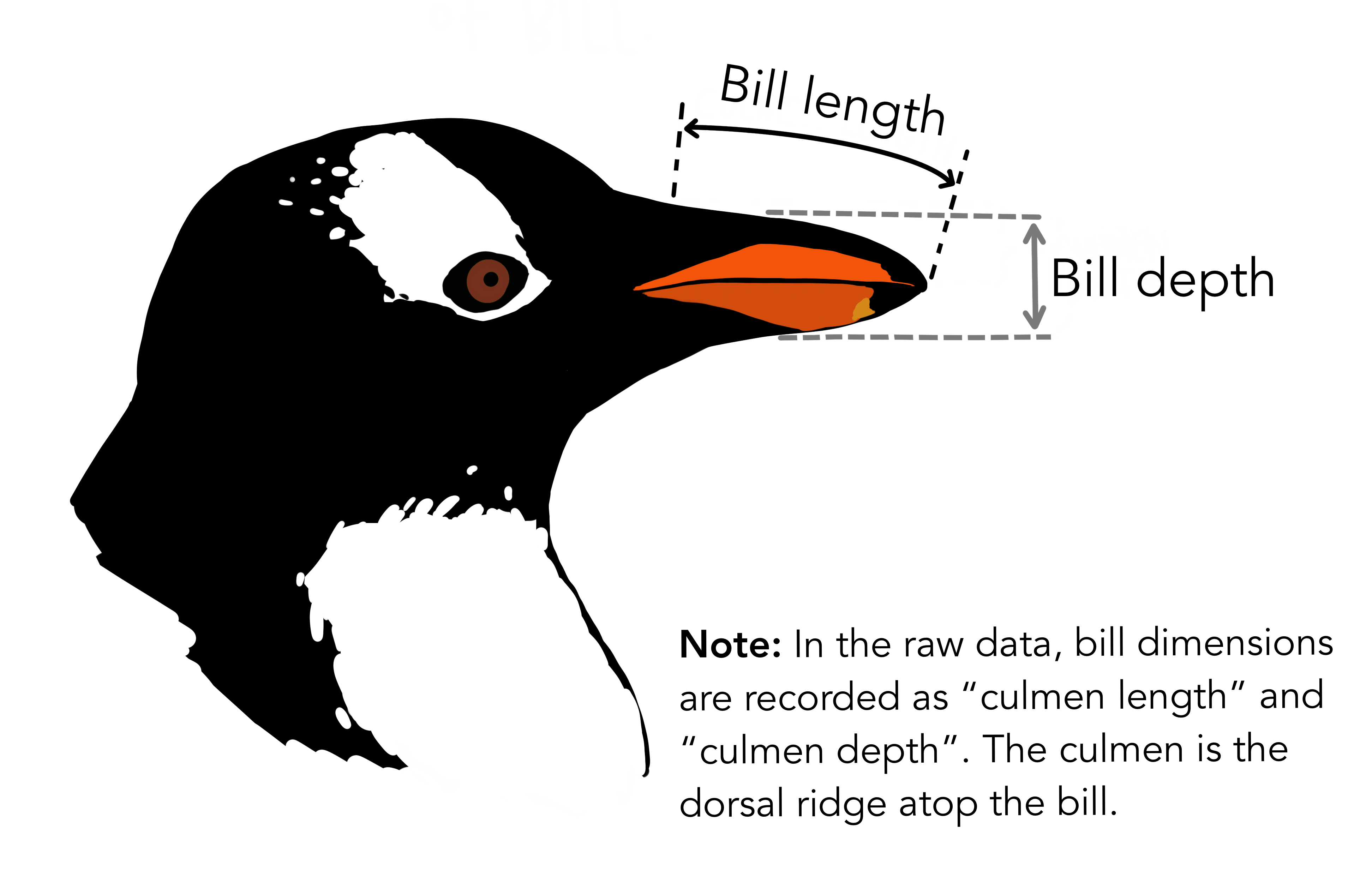
The Palmer Archipelago penguins 데이터셋의 예,


Artwork by @allison_horst

# load a dataset
penguins = sns.load_dataset("penguins")
penguins
    species     island  bill_length_mm  bill_depth_mm  flipper_length_mm  \
0    Adelie  Torgersen           39.10          18.70             181.00   
1    Adelie  Torgersen           39.50          17.40             186.00   
2    Adelie  Torgersen           40.30          18.00             195.00   
3    Adelie  Torgersen             NaN            NaN                NaN   
..      ...        ...             ...            ...                ...   
340  Gentoo     Biscoe           46.80          14.30             215.00   
341  Gentoo     Biscoe           50.40          15.70             222.00   
342  Gentoo     Biscoe           45.20          14.80             212.00   
343  Gentoo     Biscoe           49.90          16.10             213.00   

     body_mass_g     sex  
0        3750.00    Male  
1        3800.00  Female  
2        3250.00  Female  
3            NaN     NaN  
..           ...     ...  
340      4850.00  Female  
341      5750.00    Male  
342      5200.00  Female  
343      5400.00    Male  

[344 rows x 7 columns]
penguins.info()
<class 'pandas.DataFrame'>
RangeIndex: 344 entries, 0 to 343
Data columns (total 7 columns):
 #   Column             Non-Null Count  Dtype  
---  ------             --------------  -----  
 0   species            344 non-null    str    
 1   island             344 non-null    str    
 2   bill_length_mm     342 non-null    float64
 3   bill_depth_mm      342 non-null    float64
 4   flipper_length_mm  342 non-null    float64
 5   body_mass_g        342 non-null    float64
 6   sex                333 non-null    str    
dtypes: float64(4), str(3)
memory usage: 18.9 KB
Missing 결측치

NaN, NA, None

  • pandas에서는 missing을 명명하는데 R의 컨벤션을 따라 NA (not available)라 부름.
  • 대부분의 경우에서 NumPy object NaN(np.nan)을 NA을 나타내는데 사용됨.
  • np.nan은 실제로 floating-point의 특정 값으로 float64 데이터 타입임. Integer 또는 string type에서 약간 이상하게 작동될 수 있음.
  • Python object인 None은 pandas에서 NA로 인식함.
  • 현재 NA라는 새로운 pandas object 실험 중임
s = pd.Series([1, 2, np.nan, None, pd.NA])
s
0       1
1       2
2     NaN
3    None
4    <NA>
dtype: object
s.isna() # NA 여부를 확인
0    False
1    False
2     True
3     True
4     True
dtype: bool

NA의 handling에 대해서는 다음 참고

  • Mckinney’s: 7.1 Handling Missing Data,
  • Working with missing data
penguins.describe(include="str")
       species  island   sex
count      344     344   333
unique       3       3     2
top     Adelie  Biscoe  Male
freq       152     168   168
penguins.value_counts(["island", "species"])
island     species  
Biscoe     Gentoo       124
Dream      Chinstrap     68
           Adelie        56
Torgersen  Adelie        52
Biscoe     Adelie        44
Name: count, dtype: int64
penguins.value_counts(["sex", "species"], dropna=False) # NA은 기본적으로 생략
sex     species  
Male    Adelie       73
Female  Adelie       73
Male    Gentoo       61
Female  Gentoo       58
        Chinstrap    34
Male    Chinstrap    34
NaN     Adelie        6
        Gentoo        5
Name: count, dtype: int64
# NA의 개수
penguins.isna().sum()
species               0
island                0
bill_length_mm        2
bill_depth_mm         2
flipper_length_mm     2
body_mass_g           2
sex                  11
dtype: int64
# NA의 비율
penguins.isna().mean()
species             0.00
island              0.00
bill_length_mm      0.01
bill_depth_mm       0.01
flipper_length_mm   0.01
body_mass_g         0.01
sex                 0.03
dtype: float64
tips.sort_values("tip", ascending=False)
     total_bill   tip     sex smoker  day    time  size
170       50.81 10.00    Male    Yes  Sat  Dinner     3
212       48.33  9.00    Male     No  Sat  Dinner     4
23        39.42  7.58    Male     No  Sat  Dinner     4
59        48.27  6.73    Male     No  Sat  Dinner     4
..          ...   ...     ...    ...  ...     ...   ...
236       12.60  1.00    Male    Yes  Sat  Dinner     2
111        7.25  1.00  Female     No  Sat  Dinner     1
67         3.07  1.00  Female    Yes  Sat  Dinner     1
92         5.75  1.00  Female    Yes  Fri  Dinner     2

[244 rows x 7 columns]
tips.sort_values(["size", "tip"], ascending=[False, True])
     total_bill  tip     sex smoker   day    time  size
125       29.80 4.20  Female     No  Thur   Lunch     6
143       27.05 5.00  Female     No  Thur   Lunch     6
156       48.17 5.00    Male     No   Sun  Dinner     6
141       34.30 6.70    Male     No  Thur   Lunch     6
..          ...  ...     ...    ...   ...     ...   ...
67         3.07 1.00  Female    Yes   Sat  Dinner     1
111        7.25 1.00  Female     No   Sat  Dinner     1
82        10.07 1.83  Female     No  Thur   Lunch     1
222        8.58 1.92    Male    Yes   Fri   Lunch     1

[244 rows x 7 columns]
tips.nlargest(3, "tip")  # 다수의 동등 순위가 있을 때 처리: keep="first", "last", "all"
     total_bill   tip   sex smoker  day    time  size
170       50.81 10.00  Male    Yes  Sat  Dinner     3
212       48.33  9.00  Male     No  Sat  Dinner     4
23        39.42  7.58  Male     No  Sat  Dinner     4
NumPy and pandas
Data Visualization

This work © 2025 by Sungkyun Cho is licensed under CC BY-NC-SA 4.0